[1] www.linux.com/ how-to-install-and-use-wine-to-run-windows-applications-on-linux
[2] www.linux.com/ 910-i-have-just-switched-from-win7-to-zorin-ubuntu-i-have-been-working-with-an-ai-program-called-verbot-for-awhile-and-my-question-is-how-do-i-run-it-and-net-framework-on-zorin-please-help
[3] askubuntu.com/ difference-between-wine-and-mono
If your Linux PC has limited RAM and you don't want to sacrifice large chunk of RAM to run VM just to be able to run one or two windows app. Wine is your answer. You save buying one window license to run window app.
[1] Shows you how.
PlayOnlinux is also mentioned as a wonderful tool to make it possible to handle different versions of wine and wine configs because if you use it for more then one app it's sometimes necessary to install different wine versions.
You can use Wine for that purpose. but it only works on .net 2.0 / 3.0, Most probably, .net 4 is beyond the capacity right now. Ur best bet is for .net support on Linux is MONO. [2]
Wednesday, September 23, 2015

Monday, September 21, 2015
Remote desktop from Windows to Linux
[1] http://www.linux.org/threads/rdp-into-your-linux-desktop.8/
[2] http://ubuntuwiki.net/index.php/Xrdp,_installing
[3] http://askubuntu.com/questions/235905/use-xrdp-to-connect-to-desktop-session
Through VNC as most people traditionally did.
Through RDP. [1]
yum install xrdp -y
# chkconfig --levels 35 xrdp on
# service xrdp start
# rpm -Uvh http://download.fedora.redhat.com/pub/epel/5/x86_64/epel-release-5-4.noarch.rpm
Under debian using xrdp + vino [2] [3]
vi /etc/xrdp/xrdp.ini


[2] http://ubuntuwiki.net/index.php/Xrdp,_installing
[3] http://askubuntu.com/questions/235905/use-xrdp-to-connect-to-desktop-session
Through VNC as most people traditionally did.
Through RDP. [1]
yum install xrdp -y
# chkconfig --levels 35 xrdp on
# service xrdp start
# rpm -Uvh http://download.fedora.redhat.com/pub/epel/5/x86_64/epel-release-5-4.noarch.rpm
Under debian using xrdp + vino [2] [3]
vi /etc/xrdp/xrdp.ini
[globals]
bitmap_cache=yes
bitmap_compression=yes
port=3389
crypt_level=low
channel_code=1

# set empty username because VNC auth
# doesn't actually use username, so no
# point in asking the user for one.

[xrdp1]
name=Active Local Login
lib=libvnc.so
username=
password=ask
ip=127.0.0.1
port=5900

[xrdp2]
name=Clean Session
lib=libvnc.so
username=
password=ask
ip=127.0.0.1
port=5901
$sudo vino-preferences


Remote desktop from Linux to Windows
Ref
[1] http://www.techrepublic.com/blog/windows-and-office/how-do-i-connect-to-a-remote-windows-7-desktop-from-a-linux-machine/
[2] http://www.unixmen.com/remote-desktop-from-linux-to-windows-using-rdesktop-and-gnome-rdp/
Termninal Server Client....Search 'terminal server' package name in ubuntu.[1]
(Seems not available in lubuntu, so installed freerdp-x11 on lubuntu 15.04
qyang@lubuntu-laptop:~$ xfreerdp /u:username /p:password /v:10.1.1.218
'rdesktop' package for both ubuntu and fedora [2]
'gnome-rdp' GUI set up. [2]
[1] http://www.techrepublic.com/blog/windows-and-office/how-do-i-connect-to-a-remote-windows-7-desktop-from-a-linux-machine/
[2] http://www.unixmen.com/remote-desktop-from-linux-to-windows-using-rdesktop-and-gnome-rdp/
Termninal Server Client....Search 'terminal server' package name in ubuntu.[1]
(Seems not available in lubuntu, so installed freerdp-x11 on lubuntu 15.04
qyang@lubuntu-laptop:~$ xfreerdp /u:username /p:password /v:10.1.1.218
'rdesktop' package for both ubuntu and fedora [2]
'gnome-rdp' GUI set up. [2]
Saturday, September 19, 2015
Mount ISO file as a disk in Linux
[Ref] http://wiki.sugarlabs.org/go/Sugar_on_a_Stick/Installation
#mount /path/to/downloaded.iso /run/soas/
[root@fedora20 soas]# umount /run/media/q.yang/KINGSTON
[root@fedora20 mntUSBFlash]# /home/q.yang/run/soas/LiveOS/livecd-iso-to-disk --reset-mbr --overlay-size-mb 160 --home-size-mb 170 --unencrypted-home /home/q.yang/mntWin7Desktop/Fedora-Live-SoaS-i686-22-3.iso /dev/sdb1
Verifying image...
/home/q.yang/mntWin7Desktop/Fedora-Live-SoaS-i686-22-3.iso: 7101474df5e036dedae3ecca5bd918a1
Fragment sums: 6d845885a71ffb934a43ea879cfa8fffdbc16c495a88862419c0f9bf6a2d
Fragment count: 20
Press [Esc] to abort check.
Checking: 100.0%
The media check is complete, the result is: PASS.
It is OK to use this media.
/dev/sdb1 is mounted, please unmount for safety
#mount /path/to/downloaded.iso /run/soas/
[root@fedora20 soas]# umount /run/media/q.yang/KINGSTON
[root@fedora20 mntUSBFlash]# /home/q.yang/run/soas/LiveOS/livecd-iso-to-disk --reset-mbr --overlay-size-mb 160 --home-size-mb 170 --unencrypted-home /home/q.yang/mntWin7Desktop/Fedora-Live-SoaS-i686-22-3.iso /dev/sdb1
Verifying image...
/home/q.yang/mntWin7Desktop/Fedora-Live-SoaS-i686-22-3.iso: 7101474df5e036dedae3ecca5bd918a1
Fragment sums: 6d845885a71ffb934a43ea879cfa8fffdbc16c495a88862419c0f9bf6a2d
Fragment count: 20
Press [Esc] to abort check.
Checking: 100.0%
The media check is complete, the result is: PASS.
It is OK to use this media.
/dev/sdb1 is mounted, please unmount for safety
Saturday, September 5, 2015
AWS Free Tier - Amazon Web Service free trial
AWS provide one year free tier service. It can be applied from https://aws.amazon.com/
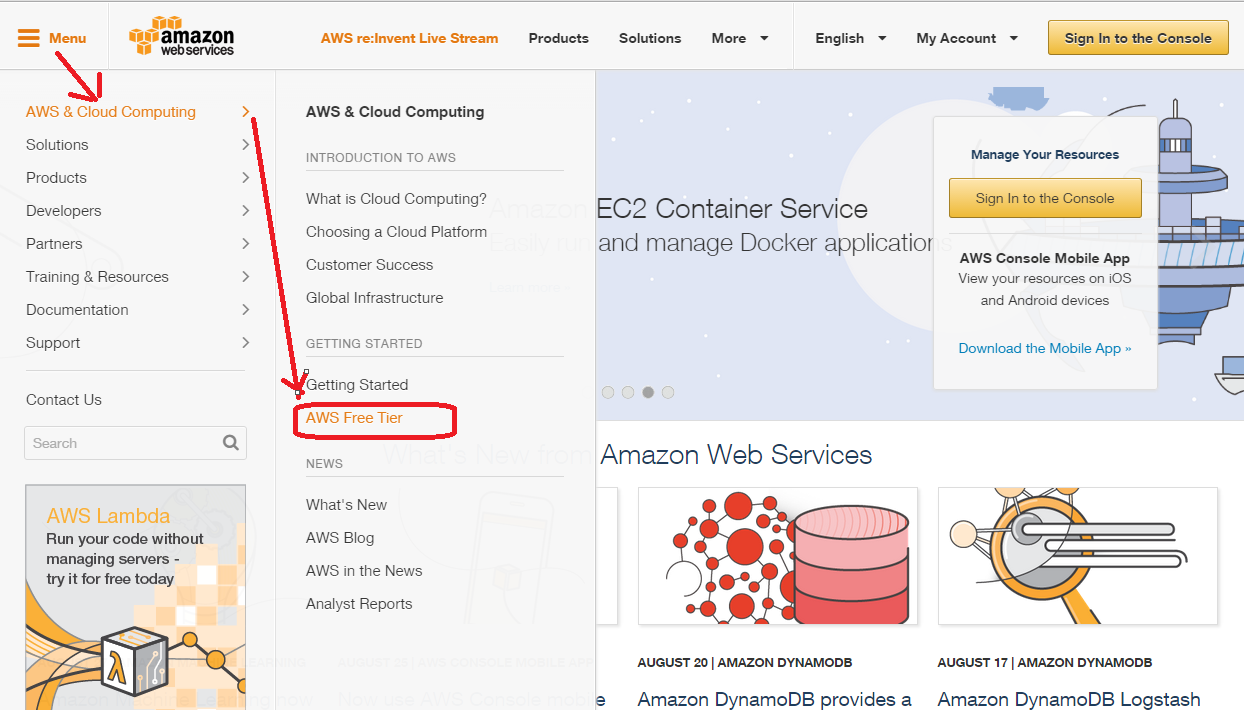
Below is the application procedure, but it needs to be applied with your valid credit card info and contact phone number.

More details about what's covered in this free tier, see Amazon web site for updated full details.
Wednesday, August 12, 2015
Popular linux distributions
http://www.howtogeek.com/191207/10-of-the-most-popular-linux-distributions-compared/
Monday, July 6, 2015
Change config.txt to resolve HDMI resolution issue on Raspberry Pi.
[1] https://www.raspberrypi.org/documentation/configuration/config-txt.md
HDMI_IGNORE_EDID
Setting this to
0xa5000080 enables the ignoring of EDID/display data if your display doesn't have an accurate EDID. It requires this unusual value to ensure that it doesn't get triggered accidentally.
Subscribe to:
Posts (Atom)