Showing posts with label Linux Programming. Show all posts

Tuesday, June 6, 2017

Set JAVA_HOME in Ubuntu


Ref from 'askubuntu.com'


Three files you could edit, '/etc/environment' is the one prefered in web post:
/etc/environment
/etc/profile
~/.bashrc

But I chose adding file: /etc/profile.d/dnm-build-envsetting.sh

- Reboot pc, and all environments variables settings remains.
        qyang@lgm-pc:~$ cat /etc/environment
        PATH="/usr/local/sbin:/usr/local/bin:/usr/sbin:/usr/bin:/sbin:/bin:/usr/games:/usr/local/games"
        qyang@lgm-pc:~$ cat /etc/profile.d/dnm-build-envsetting.sh
        # Some environmental variables required for DmM builder to work for android build.
        # 2017-JUN-09
        JAVA_HOME=/usr/lib/jvm/java-8-openjdk-amd64
        ANDROID_HOME=/home/qyang/sandbox/android-sdk-linux
        QTDIR=/home/qyang/sandbox/qt-everywhere-opensource-4.8.7
        export JAVA_HOME
        export ANDROID_HOME
        export QTDIR


My old settings:
yang@lgm-pc:~/testsetupscript$ cat /etc/environment
PATH="/usr/local/sbin:/usr/local/bin:/usr/sbin:/usr/bin:/sbin:/bin:/usr/games:/usr/local/games"
qyang@lgm-pc:~/testsetupscript$ cat /etc/profile
# /etc/profile: system-wide .profile file for the Bourne shell (sh(1))
# and Bourne compatible shells (bash(1), ksh(1), ash(1), ...).

if [ "$PS1" ]; then
  if [ "$BASH" ] && [ "$BASH" != "/bin/sh" ]; then
    # The file bash.bashrc already sets the default PS1.
    # PS1='\h:\w\$ '
    if [ -f /etc/bash.bashrc ]; then
      . /etc/bash.bashrc
    fi
  else
    if [ "`id -u`" -eq 0 ]; then
      PS1='# '
    else
      PS1='$ '
    fi
  fi
fi

# The default umask is now handled by pam_umask.
# See pam_umask(8) and /etc/login.defs.

if [ -d /etc/profile.d ]; then
  for i in /etc/profile.d/*.sh; do
    if [ -r $i ]; then
      . $i
    fi
  done
  unset i
fi

JAVA_HOME=/usr/local/java/jdk1.8.0_25
PATH=$PATH:$HOME/bin:$JAVA_HOME/bin
export JAVA_HOME
export PATH

Wednesday, March 21, 2012

C Call C++

[1] ParaShift.com
     isocpp.org/wiki/faq/mixing-c-and-cpp
[2] Bytes.com
[3] research.att.com


From [3]
------------------------
 // C++ code:
 extern "C" void f(int);
 void f(int i){
  // ...
 }
 /* C code: */
 void f(int);
 void cc(int i){
  f(i);
  /* ... */
 }

// C++ code:
 class C {
  // ...
  virtual double f(int);
 };

 extern "C" double call_C_f(C* p, int i) // wrapper function
 {
  return p->f(i);
 }

 /* C code: */
 double call_C_f(struct C* p, int i);
 void ccc(struct C* p, int i){
  double d = call_C_f(p,i);
  /* ... */
 }


 // C++ code:
 void f(int);
 void f(double);

 extern "C" void f_i(int i) { f(i); }
 extern "C" void f_d(double d) { f(d); }

 /* C code: */
 void f_i(int);
 void f_d(double);

 void cccc(int i,double d){
  f_i(i);
  f_d(d);
  /* ... */
 }


From [1]
-----------------------------
main.cpp

// This is C++ code
#include "Fred.h"
int main()
{
  Fred fred;
  c_function(&fred);
} 


c-function.c

/* This is C code */
#include "Fred.h"

void c_function(Fred* fred){
   unsigned char lc;

   cplusplus_callback_function(fred);
   lc=Cplusplus_CallbackFunction_Wilma(456,fred);
   printf("return of C++ Wilma: %d\n",lc);
} 


Fred.cpp

// This is C++ code
#include "Fred.h"
#include  /*std::cout<<*/

//Fred::Fred() : a_(0) { }
Fred::Fred() { }

void Fred::wilma(int a) { std::cout<<"wilma(arg) print arg "<        

Fred* cplusplus_callback_function(Fred* fred){
  fred->wilma(123);
  return fred;
} 

//Provide access of C++ methods from C code.
unsigned char Cplusplus_CallbackFunction_Wilma(int a, Fred* fred){
  fred->wilma(a);
  return(0);
} 


Fred.h

 
/* This header can be read by both C and C++ compilers */
 #ifndef FRED_H
 #define FRED_H

 #ifdef __cplusplus
   class Fred {
   public:
     Fred();
     void wilma(int);
   private:
     int a_;
   };
 #else
   typedef struct Fred  Fred;

 #endif


 #ifdef __cplusplus
 extern "C" {
 #endif


 #if defined(__STDC__) || defined(__cplusplus)
   extern void c_function(Fred*);   /* ANSI C prototypes */
   extern Fred* cplusplus_callback_function(Fred*);
   extern unsigned char Cplusplus_CallbackFunction_Wilma(int a, Fred* fred);
 #else
   extern void c_function();        /* K&R style */
   extern Fred* cplusplus_callback_function();
 #endif

 #ifdef __cplusplus
 }

 #endif
 #endif /*FRED_H*/


Makefile
DESTDIR  = ./
PROGRAM = $(DESTDIR)/CCallCplusplus
SRCDIR = ./
INCL = -I ./
CP = g++
C = gcc
#C = arm-none-linux-gnueabi-g++

OBJS := $(addprefix $(DESTDIR)/,main.o Fred.o c-function.o)
DEBUG = -g
CFLAGS = -Wall $(DEBUG)

all:$(PROGRAM)

$(PROGRAM): $(OBJS)
 $(CP) -o $(PROGRAM) $(OBJS) -lpthread

$(DESTDIR)/%.o:$(SRCDIR)/%.cpp
 $(CP) -c $(CFLAGS) $< -o $@ $(INCL)

$(DESTDIR)/%.o:$(SRCDIR)/%.c
 $(C) -c $(CFLAGS) $< -o $@ $(INCL)

clean :
 rm -f $(OBJS)
 rm -f $(PROGRAM)


Result:

wilma(arg) print arg 123
wilma(arg) print arg 456
return of C++ Wilma: 0

Monday, February 28, 2011

Calling 'shell' from C/C++ code under Linux

See man page for those functions. Popen is better than system if want see return value of shell.

system()
popen()
pclose()

Monday, February 14, 2011

GPIO Interrupt in Linux

[1] http://bec-systems.com/site/281/how-to-implement-an-interrupt-driven-gpio-input-in-linux
[2] Linux Device Drivers 3rd Edition.
[3] http://blackfin.uclinux.org/gf/project/uclinux-dist/forum/?_forum_action=ForumMessageBrowse&thread_id=23417&action=ForumBrowse
[4] http://docs.blackfin.uclinux.org/doku.php?id=linux-kernel:drivers:simple-gpio
[5] http://docs.blackfin.uclinux.org/doku.php?id=linux-kernel:drivers:gpio-sysfs
[6] http://docs.blackfin.uclinux.org/doku.php?id=linux-kernel:interrupts#gpio_interrupt_processing

[7] http://osdir.com/ml/android-platform/2010-01/msg00294.html
[8] http://linux.derkeiler.com/Mailing-Lists/Kernel/2009-06/msg04562.html Proposed PATCH for Gpiolib.c/h


irqs.h (x:\lpc3250\ltib-qs\rpm\BUILD\linux-2.6.34\arch\arm\mach-lpc32xx\include\mach)
irq.c (x:\lpc3250\ltib-qs\rpm\BUILD\linux-2.6.34\arch\arm\mach-lpc32xx)
phy3250.c (x:\lpc3250\ltib-qs\rpm\BUILD\linux-2.6.34\arch\arm\mach-lpc32xx) line202 static struct amba_device lpc32xx_ssp0_device

gpiolib.c (x:\lpc3250\ltib-qs\rpm\BUILD\linux-2.6.34\arch\arm\mach-lpc32xx)line 351
static struct lpc32xx_gpio_chip lpc32xx_gpiochip[] = {
{
.chip = {
.label = "gpio_p0",
.direction_input = lpc32xx_gpio_dir_input_p012,
.get = lpc32xx_gpio_get_value_p012,
.direction_output = lpc32xx_gpio_dir_output_p012,
.set = lpc32xx_gpio_set_value_p012,
.request = lpc32xx_gpio_request,
.base = LPC32XX_GPIO_P0_GRP,
.ngpio = LPC32XX_GPIO_P0_MAX,
.names = gpio_p0_names,
.can_sleep = 0,
},
.gpio_grp = &gpio_grp_regs_p0,
},


you cannot write an IRQ handler in userspace, it needs to be in kernel space.

What you will probably end up with is a loadable kernel module containing your interrupt handler and a pseudo-file interface to the variables it manipulates. The interrupt handler executes in its own context. The pseudo-file interface will execute in the kernel context, so be careful to protect the data it shares with the interrupt handler using the appropriate semaphores. You will use file operations at the pseudo-file as a bridge from your user-space program to the kernel space variables manipulated by the interrupt handler.[3]

You will find out when you get into the literature that pseudo-files are not real files and don't have the overhead of actually writing stuff in persistent store. They are ways of using read(), write() and ioctl() functions on file handles from user space to invoke functionality in the kernel. From your application you open a file handle to your pseudo-file and when you call these functions on it code you have added to the kernel springs to life. There is a framework that takes care of the transition from user- to kernel-space. Inside the kernel, your functions can share variables with your interrupt service routine.

This is all standard Linux stuff and you may find out more from general Linux forums (in addition to the right books). [3]


[root@GsnCommsModule user]# cat /proc/interrupts
CPU0
9: 44 - serial
16: 4760671 - LPC32XX Timer Tick
20: 1018101 - pl022
21: 0 - pl022
28: 103638 - DMA
29: 901999 - eth0
50: 0 - pnx-i2c
51: 0 - pnx-i2c
52: 0 - rtc-lpc32xx
59: 216 - ohci_hcd:usb1
63: 45 - pnx-i2c
Err: 0

Wednesday, January 5, 2011

GCC byte alignment for data structure

[1] http://www.velocityreviews.com/forums/t651650-does-gcc-has-compile-option-for-bytes-alignment.html
[2] detailed gcc user manual see http://gcc.gnu.org/onlinedocs/gcc-4.3.5/gcc.pdf

IN GCC
---------------------------------------------
__attribute__((aligned(4)))
__attribute__((packed))


#include
#include

struct struct_1{
unsigned char byte1;
unsigned short word2;
unsigned char byte3;
unsigned char byte4;
unsigned char byte5;
}__attribute__((aligned(1)));

struct struct_1_packed{
unsigned char byte1;
unsigned short word2;
unsigned char byte3;
unsigned char byte4;
unsigned char byte5;
}__attribute__((packed));

struct struct_2{
unsigned char byte1;
unsigned char byte2;
unsigned char byte3;
unsigned char byte4;
unsigned char byte5;
}__attribute__((aligned(1)));


int main (int argc, char *argv[])
{
struct struct_1 One;
struct struct_2 Two;
struct struct_1_packed Three;

printf("size of struct one is %d\n",sizeof(struct_1));
printf("size of struct two is %d\n",sizeof(struct_2));
printf("size of struct three is %d\n",sizeof(struct_1_packed));


}

ScreenPrint 'size of struct one is 8'
'size of struct two is 5'
'size of struct two is 6'


IN PIC32
------------------------------------------
typedef struct cableTrackerConfigFrHostStruct
{
S_CABLETRACKER_CONFIG_COM sComConfig;
S_CABLETRACKER_CONFIG_DAQ sDaqConfig;
GSNTYPES_USHORT iChkSum;
}
#ifdef TARGET
__attribute__((packed)) S_CABLETRACKER_CONFIG_IN_SDCARD;
#else
S_CABLETRACKER_CONFIG_IN_SDCARD;
#endif

Tuesday, January 4, 2011

Linux Segmentation fault debugging.

[1] http://www.cprogramming.com/debugging/segfaults.html
[2] http://prefetch.net/blog/index.php/2006/12/21/generating-core-files-from-gdb/


% gdb example core

Some copyright info

Core was generated by `example'.
Program terminated with signal 11, Segmentation fault.

Some information about loading symbols
#0 0x0804838c in foo() () at t.cpp:4
4 *x = 3;


(gdb)run
(gdb)generate-core-file
Saved corefile core.2575

(gdb)detach

--------------------------------------------------
[3] https://stackoverflow.com/questions/8545931/using-gdb-to-convert-addresses-to-lines

addr2line -e /path/to/non-stripped/.../my-buggy-app 0x4a6889 0x4a8b43 0x4e8765

------------------------------
qyang@lgm-pc:~/Git_Local_DnM_Dev/GitPro-Builder/builder$ addr2line -C -f -e ./build/exports/arm-angstrom-linux-gnueabi-release/bin/gem 0x7aeb8
        CPlaybackTrackerManager::RemoveTracker(unsigned long)
        ??:?

$ addr2line -C -f -e ./build/exports/arm-angstrom-linux-gnueabi-release/bin/gem 0xf18cc
CDPMSClient::GetBugFixList(unsigned long, CCUXmlParser::_TBugFixInfo*)
??:?

---------------------------

/lib/libc-2.25.so(__default_rt_sa_restorer+0x0)[0xb5e59bd0]+0x2cbd0
/usr/lib/lib_resampler.so(ia_error_handler_log.part.0+0x70)[0xb6a886d0]+0x56d0

$ export PATH=$(pwd)/build/exports/host/toolchain/bin/arm-aios63-linux-gnueabi/bin:$PATH
$ arm-aios63-linux-gnueabi-addr2line -Cf -e build/exports/arm-aios63-linux-gnueabi-release/build/resampler/lib_resampler.so 56d0
ia_error_handler_log
/home/doug/current_dev/build/thirdparty/ittiam/src/ia_error_handler.c:85
$ arm-aios63-linux-gnueabi-addr2line -Cf -e build/exports/arm-aios63-linux-gnueabi-release/sysroot/lib/libc-2.25.so +0x2cbd0
__default_rt_sa_restorer
/home/doug/current_dev/build/exports/host/toolchain/src/.build/src/glibc-2.25/signal/../sysdeps/unix/sysv/linux/arm/sigrestorer.S:80


Monday, December 13, 2010

thread relevant function in Linux

CREATE THREADS
---------------------
int pthread_create(pthread_t *restrict thread,
const pthread_attr_t *restrict attr,
void *(*start_routine)(void*), void *restrict arg);

WAIT FOR THE FINISH OF THREAD
-------------------------------------
int pthread_join(pthread_t thread, void **value_ptr);

PROTECTION OF SHARED RESOURCE AMONG MULTIPLE THREADS
------------------------------------------------------
int pthread_mutex_lock(pthread_mutex_t *mutex);
int pthread_mutex_trylock(pthread_mutex_t *mutex);
int pthread_mutex_unlock(pthread_mutex_t *mutex);
If the mutex is already locked, the calling thread shall block
until the mutex becomes available.

THREAD SYNCH BY BLOCKING ON A CONDITION VARIABLE
--------------------------------------------------
int pthread_cond_timedwait(pthread_cond_t *restrict cond,
pthread_mutex_t *restrict mutex,
const struct timespec *restrict abstime);
int pthread_cond_wait(pthread_cond_t *restrict cond,
pthread_mutex_t *restrict mutex);
Condition Variables: pthreads support condition variables, which
allow one thread to wait (sleep) for an event generated by any other thread.
This allows us to avoid the busy waiting problem.


THREAD SYNCH BY UNBLOCKING THREAD BLOCKED ON A CONDITION VARIABLE
------------------------------------------------------------------
int pthread_cond_broadcast(pthread_cond_t *cond); unblock all
int pthread_cond_signal(pthread_cond_t *cond); unblock at least one thread
The thread(s) that are unblocked shall contend for the mutex according to the
scheduling policy (if applicable), and as if each had called pthread_mutex_lock().


THREAD ATTRIBUTES SETTING
-----------------------------
int pthread_attr_destroy(pthread_attr_t *attr);
int pthread_attr_init(pthread_attr_t *attr);

SET THREAD SCHEDULING POLICY
---------------------------------
int pthread_attr_getschedparam(const pthread_attr_t *restrict attr,
struct sched_param *restrict param);
int pthread_attr_setschedparam(pthread_attr_t *restrict attr,
const struct sched_param *restrict param);

int pthread_attr_getscope(const pthread_attr_t *restrict attr,
int *restrict contentionscope);
int pthread_attr_setscope(pthread_attr_t *attr, int contentionscope);
contentionscope -- PTHREAD_SCOPE_SYSTEM,PTHREAD_SCOPE_PROCESS

int pthread_attr_getschedpolicy(const pthread_attr_t *restrict attr,
int *restrict policy);
int pthread_attr_setschedpolicy(pthread_attr_t *attr, int policy);
policy -- SCHED_FIFO, SCHED_RR, SCHED_SPORADIC,and SCHED_OTHER

TERMINATE THREAD
----------------------
void pthread_exit(void *value_ptr);
If main() returns or any thread calls, exit()all threads are terminated


OTHER PASTRIES PTHREAD FUNCTIONS
-----------------------------------
int pthread_key_create(pthread_key_t *key, void (*destructor)(void*));
int pthread_once(pthread_once_t *once_control,
void (*init_routine)(void));
pthread_once_t once_control = PTHREAD_ONCE_INIT;
void *pthread_getspecific(pthread_key_t key);
int pthread_setspecific(pthread_key_t key, const void *value);


Be aware of a list of the Posix thread-safe functions

FW: 可重入函数

[1] http://blog.chinaunix.net/u2/68846/showart_689446.html


把一个不可重入函数变成可重入的唯一方法是用可重入规则来重写他。
其实很简单,只要遵守了几条很容易理解的规则,那么写出来的函数就是可重入的。

第一,不要使用全局变量。因为别的代码很可能覆盖这些变量值。
第二,在和硬件发生交互的时候,切记执行类似disinterrupt()之类的操作,就是关闭硬件中断。完成交互记得打开中断,在有些系列上,这叫做“进入/退出核心”或者用OS_ENTER_KERNAL/OS_EXIT_KERNAL来描述。
第三,不能调用任何不可重入的函数。
第四,谨慎使用堆栈。最好先在使用前先OS_ENTER_KERNAL。

还有一些规则,都是很好理解的,总之,时刻记住一句话:保证中断是安全的!

Sunday, December 12, 2010

makefile of ThreadTest Program

[q.yang@localhost Sample_011_pThread_test]$ cat makefile
DESTDIR = ./debug
PROGRAM = $(DESTDIR)/ThreadTest
SRCDIR = ./
C = g++
OBJS := $(addprefix $(DESTDIR)/,task1.o)
DEBUG = -g
CFLAGS = -Wall $(DEBUG)

$(PROGRAM): $(OBJS)
$(C) -o $(PROGRAM) $(OBJS)

-lpthread


$(DESTDIR)/%.o:$(SRCDIR)/%.cpp
$(C) -c $(CFLAGS) $< -o $@ $(INCL)

clean :
rm -f $(OBJS)
rm -f $(PROGRAM)

Thursday, December 9, 2010

Thread Vs Process

[1] http://www.cs.rpi.edu/~hollingd/netprog2001/notes/threads/threads.pdf
[2] http://blog.csdn.net/lanmoshui963/archive/2008/03/13/2176376.aspx
[3] sample thread code. http://paste.ubuntu.org.cn/809
[4] http://blog.chinaunix.net/u2/68846/showart_1077115.html
[5] http://www.yolinux.com/TUTORIALS/LinuxTutorialPosixThreads.html MultiThread Debugging
[6] http://www.linuxselfhelp.com/HOWTO/C++Programming-HOWTO-18.html
[7] http://www.codeproject.com/KB/threads/threadobject.aspx Sample Codes CThread
[8] http://www.ibm.com/developerworks/cn/linux/thread/posix_threadapi/part2/ ThreadProgGuide
[9] http://blog.chinaunix.net/u/22935/showart_310711.html CN BLOG of thread prog


多线程可以把程序中处理用户输入输出的部分与其它部分分开。
线程的缺点 线程也有不足之处。编写多线程程序需要更全面更深入的思考。在一个多线程程序里,因时间分配上的细微偏差或者因共享了不该共享的变量而造成不良影响的可能性是很大的。调试一个多线程程序也比调试一个单线程程序困难得多。
进程的所有信息对该进程的所有线程都是共享的,包括可执行的程序文本,程序的全局内存和堆内存、栈以及文件描述符。[9]

The static function will then typecast the void * and use it to call a non static member function. [6]

从逻辑角度来看,多线程的意义在于一个应用程序中,有多个执行部分可以同时执行。但操作系统并没有将多个线程看做多个独立的应用,来实现进程的调度和管理以及资源分配。这就是进程和线程的重要区别。

线程是进程的一个实体,是CPU调度和分派的基本单位,它是比进程更小的能独立运行的基本单位.线程自己基本上不拥有系统资源,只拥有一点在运行中必不可少的资源(如程序计数器,一组寄存器和栈),但是它可与同属一个进程的其他的线程共享进程所拥有的全部资源。

一个线程可以创建和撤销另一个线程,同一个进程中的多个线程之间可以并发执行。

线程有自己的堆栈和局部变量,但线程之间没有单独的地址空间,一个线程死掉就等于整个进程死掉,所以多进程的程序要比多线程的程序健壮,但在进程切换时,耗费资源较大,效率要差一些。但对于一些要求同时进行并且又要共享某些变量的并发操作,只能用线程,不能用进程。

对开发人员来说,线程之间的数据共享比进程之间的容易得多。在 unix 上,进程间数据共享是通过管道、SOCKET、共享内存、信号灯等机制实现的,在 windows 上也有一套类似的机制。而线程间数据共享只需要共享全局变量即可。多进程无疑比多线程程序更健壮一些,但是代价也是比较大的,特别在进程数或者线程数较多的情况下。

进程在执行过程中有内存单元的初始入口点,并且进程存活过程中始终拥有独立的内存地址空间;

●进程的生存期状态包括创建、就绪、运行、阻塞和死亡等类型;

●从应用程序进程在执行过程中向CPU发出的运行指令形式不同,可以将进程的状态分为用户态和核心态。处于用户态下的进程执行的是应用程序指令、处于核心态下的应用程序进程执行的是操作系统指令。

在Unix操作系统启动过程中,系统自动创建swapper、init等系统进程,用于管理内存资源以及对用户进程进行调度等。在Unix环境下无论是由操作系统创建的进程还要由应用程序执行创建的进程,均拥有唯一的进程标识(PID)。[4]


Creation of a new process using fork is expensive (time & memory).
A thread (sometimes called a lightweight process) does not require lots of memory or startup time.


Each process can include many threads.
All threads of a process share:
– memory (program code and global data)
– open file/socket descriptors
– signal handlers and signal dispositions
– working environment (current directory, user ID,
etc.)


Each thread has it’s own:
– Thread ID (integer)
– Stack, Registers, Program Counter
– errno (if not - errno would be useless!)
Threads within the same process can
communicate using shared memory.
Must be done carefully!


We will focus on Posix Threads - most widely
supported threads programming API.
You need to link with “-lpthread”
On many systems this also forces the
compiler to link in re-entrant libraries
(instead of plain vanilla C libraries).


pthread_create(
pthread_t *tid,
const pthread_attr_t *attr,
void *(*func)(void *),
void *arg);
func is the function to be called.
When func() returns the thread is terminated.


• The return value is 0 for OK.
positive error number on error.
• Does not set errno !!!
• Thread ID is returned in tid


Thread Arguments (cont.)
----------------------------------
Complex parameters can be passed by creating
a structure and passing the address of the
structure.
The structure can't be a local variable (of the
function calling pthread_create)!!
- threads have different stacks!


Joinable Thread
------------------------------
Joinable: on thread termination the thread ID
and exit status are saved by the OS.
One thread can "join" another by calling
pthread_join- which waits (blocks)
until a specified thread exits.
int pthread_join( pthread_t tid,
void **status);


Shared Global Variables
---------------------------------
int counter=0;
void *pancake(void *arg) {
counter++;
printf("Thread %u is number %d\n",
pthread_self(),counter);
}
main() {
int i; pthread_t tid;
for (i=0;i<10;i++)
pthread_create(&tid,NULL,pancake,NULL);
}


Locking and Unlocking
----------------------------
• To lock use:
pthread_mutex_lock(pthread_mutex_t &);
• To unlock use:
pthread_mutex_unlock(pthread_mutex_t &);
• Both functions are blocking!


Condition Variables (cont.)
------------------------------
A condition variable is always used with mutex.
pthread_cond_wait(pthread_cond_t *cptr,
pthread_mutex_t *mptr);
pthread_cond_signal(pthread_cond_t
*cptr);
don’t let the word signal confuse you -
this has nothing to do with Unix signals


摘自资料(linux 与Windows不同)

线程间无需特别的手段进行通信,因为线程间可以共享数据结构,也就是一个全局变量可以被两个线程同时使用。不过要注意的是线程间需要做好同步,一般用 mutex。可以参考一些比较新的UNIX/Linux编程的书,都会提到Posix线程编程,比如《UNIX环境高级编程(第二版)》、《UNIX系统编程》等等。 linux的消息属于IPC,也就是进程间通信,线程用不上。

linux用pthread_kill对线程发信号。 另:windows下不是用post..(你是说PostMessage吗?)进行线程通信的吧?

windows用PostThreadMessage进行线程间通信,但实际上极少用这种方法。还是利用同步多一些 LINUX下的同步和Windows原理都是一样的。不过Linux下的singal中断也很好用。

用好信号量,共享资源就可以了。

使用多线程的理由之一是和进程相比,它是一种非常"节俭"的多任务操作方式。我们知道,在Linux系统下,启动一个新的进程必须分配给它独立的地址空间,建立众多的数据表来维护它的代码段、堆栈段和数据段,这是一种"昂贵"的多任务工作方式。而运行于一个进程中的多个线程,它们彼此之间使用相同的地址空间,共享大部分数据,启动一个线程所花费的空间远远小于启动一个进程所花费的空间,而且,线程间彼此切换所需的时间也远远小于进程间切换所需要的时间。

  使用多线程的理由之二是线程间方便的通信机制。对不同进程来说,它们具有独立的数据空间,要进行数据的传递只能通过通信的方式进行,这种方式不仅费时,而且很不方便。线程则不然,由于同一进程下的线程之间共享数据空间,所以一个线程的数据可以直接为其它线程所用,这不仅快捷,而且方便。当然,数据的共享也带来其他一些问题,有的变量不能同时被两个线程所修改,有的子程序中声明为static的数据更有可能给多线程程序带来灾难性的打击,这些正是编写多线程程序时最需要注意的地方。
1、简单的多线程程序

首先在主函数中,我们使用到了两个函数,pthread_create和pthread_join,并声明了一个pthread_t型的变量。
pthread_t在头文件pthread.h中已经声明,是线程的标示符

函数pthread_create用来创建一个线程,函数原型:

extern int pthread_create __P ((pthread_t *__thread, __const pthread_attr_t *__attr,void *(*__start_routine) (void *), void *__arg));

  第一个参数为指向线程标识符的指针,第二个参数用来设置线程属性,第三个参数是线程运行函数的起始地址,最后一个参数是运行函数的参数。若我们的函数thread不需要参数,所以最后一个参数设为空指针。第二个参数我们也设为空指针,这样将生成默认属性的线程。对线程属性的设定和修改我们将在下一节阐述。当创建线程成功时,函数返回0,若不为0则说明创建线程失败,常见的错误返回代码为EAGAIN和EINVAL。前者表示系统限制创建新的线程,例如线程数目过多了;后者表示第二个参数代表的线程属性值非法。创建线程成功后,新创建的线程则运行参数三和参数四确定的函数,原来的线程则继续运行下一行代码。
函数pthread_join用来等待一个线程的结束。函数原型为:

  extern int pthread_join __P ((pthread_t __th, void **__thread_return));

  第一个参数为被等待的线程标识符,第二个参数为一个用户定义的指针,它可以用来存储被等待线程的返回值。这个函数是一个线程阻塞的函数,调用它的函数将一直等待到被等待的线程结束为止,当函数返回时,被等待线程的资源被收回。一个线程的结束有两种途径,一种是象我们上面的例子一样,函数结束了,调用它的线程也就结束了;另一种方式是通过函数pthread_exit来实现。它的函数原型为:

  extern void pthread_exit __P ((void *__retval)) __attribute__ ((__noreturn__));

  唯一的参数是函数的返回代码,只要pthread_join中的第二个参数thread_return不是NULL,这个值将被传递给 thread_return。最后要说明的是,一个线程不能被多个线程等待,否则第一个接收到信号的线程成功返回,其余调用pthread_join的线程则返回错误代码ESRCH。

2、修改线程的属性
设置线程绑定状态的函数为pthread_attr_setscope,它有两个参数,第一个是指向属性结构的指针,第二个是绑定类型,它有两个取值:PTHREAD_SCOPE_SYSTEM(绑定的)和PTHREAD_SCOPE_PROCESS(非绑定的)。下面的代码即创建了一个绑定的线程。

#include
pthread_attr_t attr;
pthread_t tid;

/*初始化属性值,均设为默认值*/
pthread_attr_init(&attr);
pthread_attr_setscope(&attr, PTHREAD_SCOPE_SYSTEM);

pthread_create(&tid, &attr, (void *) my_function, NULL);

3、线程的数据处理

和进程相比,线程的最大优点之一是数据的共享性,各个进程共享父进程处沿袭的数据段,可以方便的获得、修改数据。但这也给多线程编程带来了许多问题。我们必须当心有多个不同的进程访问相同的变量。许多函数是不可重入的,即同时不能运行一个函数的多个拷贝(除非使用不同的数据段)。在函数中声明的静态变量常常带来问题,函数的返回值也会有问题。因为如果返回的是函数内部静态声明的空间的地址,则在一个线程调用该函数得到地址后使用该地址指向的数据时,别的线程可能调用此函数并修改了这一段数据。在进程中共享的变量必须用关键字volatile来定义,这是为了防止编译器在优化时(如gcc中使用 -OX参数)改变它们的使用方式。为了保护变量,我们必须使用信号量、互斥等方法来保证我们对变量的正确使用。

4、互斥锁

互斥锁用来保证一段时间内只有一个线程在执行一段代码。必要性显而易见:假设各个线程向同一个文件顺序写入数据,最后得到的结果一定是灾难性的

Tuesday, November 16, 2010

Bash_Prog while loop and Delay

[1] http://www.faqs.org/docs/bashman/bashref_68.html


#!/bin/bash

var0=0
LIMIT=10

while [ ! -a /dev/ttyUSB3 ]

#while [ -a /dev/tty6 ]
do
echo "checking /dev/ttyUSB3 " # -n suppresses newline.
sleep 3
done

#exit 1

Monday, November 15, 2010

GPIO Access from user space.

[1] http://www.avrfreaks.net/wiki/index.php/Documentation:Linux/GPIO#Getting_access_to_a_GPIO


CREATE 'gpo06' FOR USER SPACE GPIO ACCESS
------------------------------------------------
[root@GsnCommsModule user]# echo "85" > /sys/class/gpio/export
[root@GsnCommsModule user]# ls /sys/class/gpio/
export gpiochip32 gpiochip51 gpiochip8 unexport
gpiochip0 gpiochip45 gpiochip79 gpo06
[root@GsnCommsModule user]#

Wednesday, October 27, 2010

Wednesday, September 15, 2010

Gcc Command line based quick compiling


task2.cpp

#include
using namespace std;

int main()
{
char line[100];


cin >> line;

cout << "input data stream is:\n"< return 0;
}


[q.yang@localhost Sandbox]$ g++ task2.cpp -o task2
[q.yang@localhost Sandbox]$ ll
total 28
-rwxr-xr-x 1 q.yang developer 6392 2010-09-16 12:44 task2
-rw-r--r-- 1 q.yang developer 168 2010-09-16 12:31 task2.cpp
-rw-r--r-- 1 q.yang developer 1976 2010-09-16 12:34 task2.o

[q.yang@localhost Sandbox]$ ./task2
hello
input data stream is:
hello

Thursday, July 29, 2010

Task synchronization in Linux

[1] http://docs.blackfin.uclinux.org/doku.php?id=linux-kernel:programming
[2] Understanding the Linux Kernel, 3rd Edition By Daniel P. Bovet, Marco Cesati Publisher: O'Reilly Pub Date: November 2005 ISBN: 0-596-00565-2 Pages: 942
[3] http://publib.boulder.ibm.com/infocenter/iseries/v5r3/index.jsp?topic=/apis/apiexusmem.htm


KERNEL THREAD
--------------------
The only difference between a kernel thread and a user thread is the fact that the kernel thread has no user task memory mapping. Like other user processes it shares the kernel address space but the thread operates only in kernel space with kernel privilages.

A thread is normally designed as a continous loop that calls some wait or scheduling function to stop it consuming 100% of the CPU.

Process creat thread


SPIN LOCK
----------------------------
As a general rule, kernel preemption is disabled in every critical region protected by spin locks. In the case of a uniprocessor system, the locks themselves are useless, and the spin lock primitives just disable or enable the kernel preemption. Please notice that kernel preemption is still enabled during the busy wait phase, thus a process waiting for a spin lock to be released could be replaced by a higher priority process. [2] 5.2.4


SEMAPHORES
-------------------------
Why need semaphore?

In general, safe access to a global variable is ensured by using atomic operations . In the previous example, data corruption is not possible if the two control paths read and decrease V with a single, noninterruptible operation. However, kernels contain many data structures that cannot be accessed with a single operation.

The down( ) method decreases the value of the semaphore. If the new value is less than 0, the method adds the running process to the semaphore list and then blocks (i.e., invokes the scheduler). The up( ) method increases the value of the semaphore and, if its new value is greater than or equal to 0, reactivates one or more processes in the semaphore list. [2] 1.6.5

Each data structure to be protected has its own semaphore, which is initialized to 1. When a kernel control path wishes to access the data structure, it executes the down( ) method on the proper semaphore. If the value of the new semaphore isn't negative, access to the data structure is granted. Otherwise, the process that is executing the kernel control path is added to the semaphore list and blocked.

[2] 1.6.5.3

Linux offers two kinds of semaphores:
Kernel semaphores, which are used by kernel control paths
System V IPC semaphores, which are used by User Mode processes [2] 5.2.8

The semaphore value is positive if the protected resource is available, and 0 if the protected resource is currently not available. A process that wants to access the resource tries to decrease the semaphore value; the kernel, however, blocks the process until the operation on the semaphore yields a positive value. When a process relinquishes a protected resource, it increases its semaphore value; in doing so, any other process waiting for the semaphore is woken up. [2] 19.3.3

int semget(key_t key, int nsems, int semflg);
int semop(int semid, struct sembuf *sops, unsigned nsops);
int semtimedop(int semid, struct sembuf *sops, unsigned nsops,
struct timespec *timeout);


type struct sembuf containing the following members:
unsigned short sem_num; /* semaphore number */
short sem_op; /* semaphore operation */
short sem_flg; /* operation flags */

sem_flg are IPC_NOWAIT and SEM_UNDO

SAMPLES [3]

/* Oprations on semaphore. */

union semun {
int val; /* Value for SETVAL */
struct semid_ds *buf; /* Buffer for IPC_STAT, IPC_SET */
unsigned short *array; /* Array for GETALL, SETALL */
struct seminfo *__buf; /* Buffer for IPC_INFO
(Linux-specific) */
};

Thursday, July 22, 2010

Installation of Eclipse CDT IDE in Fedora 9.

Ref [1] http://infocenter.arm.com/help/index.jsp?topic=/com.arm.doc.dai0201a/index.html Debugging Linux Application using Eclipse+GDB


1. Download latest Eclipse CDT IDE.
--------------------------------------------
From:
http://www.eclipse.org/downloads/download.php?file=/technology/epp/downloads/release/helios/R/eclipse-cpp-helios-linux-gtk.tar.gz

[q.yang@localhost Download]$ ll
-rwxr--r-- 1 q.yang q.yang 91574228 2010-07-23 14:25 eclipse-cpp-helios-linux-gtk.tar.gz


3. Installation Eclipse CDT (IDE 3.6.0 CDT 7.0.0)
----------------------------------------------------
[q.yang@localhost ~]$ mkdir EclipseCDT
[q.yang@localhost EclipseCDT]$ tar zxf ~/Download/eclipse-cpp-helios-linux-gtk.tar.gz


4. Start first Eclipse Project
------------------------------------------
[q.yang@localhost eclipse]$./eclipse

Then set work space storage folder
/home/q.yang/EclipseCDT/qywkspace

Add /home/q.yang/EclipseCDT/eclipse/ into $PATH so that command line '$eclipse' will open eclipse IDE.


5. Create Make file based C/C++ application project
---------------------------------------------------
Not makefile will be generated by eclipse CDT. Good for import existing makefile based source codes and projects. Only use eclipse as a debugger mainly and trigger 'make'.


New-->C++ project
Then give the project name 'GsnProjEclipseHelloCpp'.
And uncheck 'use default location', browse to choose Root directory of source codes '/home/q.yang/lpc3250/ltib-qs/rootfs/home/user/GsnHelloCppRoot'

As shown in this screen shot.


After creating 'Makefile project', attached is the project view screen shot:


6. Set debug configuration
-----------------------------------------------------
In C/C++ editing view, right click project, choose 'Debug As' -> 'Debug Configurations ...'

Create button to new a debug configuration, rename this new debug configuration as 'GsnProjEclipseDebugConfig'.
Then click browse to choose C/C++ application 'hellocpp', which is the binary executable program generated by makefile.

As shown in this screen shot:


Set up GDB debugger (from LTIB tool chain) and GDB command file as shown in the screen shot:


[q.yang@localhost qywkspace]$ pwd
/home/q.yang/EclipseCDT/qywkspace
[q.yang@localhost qywkspace]$ ll
total 16
-rw-rw-r-- 1 q.yang q.yang 145 2010-07-26 12:28 eclipseGdbCmdFile
drwxrwxr-x 4 q.yang q.yang 4096 2010-07-26 14:20 Gsn_HelloCpp_Eclipse
[q.yang@localhost qywkspace]$ cat eclipseGdbCmdFile
set remotetimeout 0
set solib-absolute-prefix /opt/freescale/usr/local/gcc-4.1.2-glibc-2.5-nptl-3/arm-none-linux-gnueabi/arm-none-linux-gnueabi/


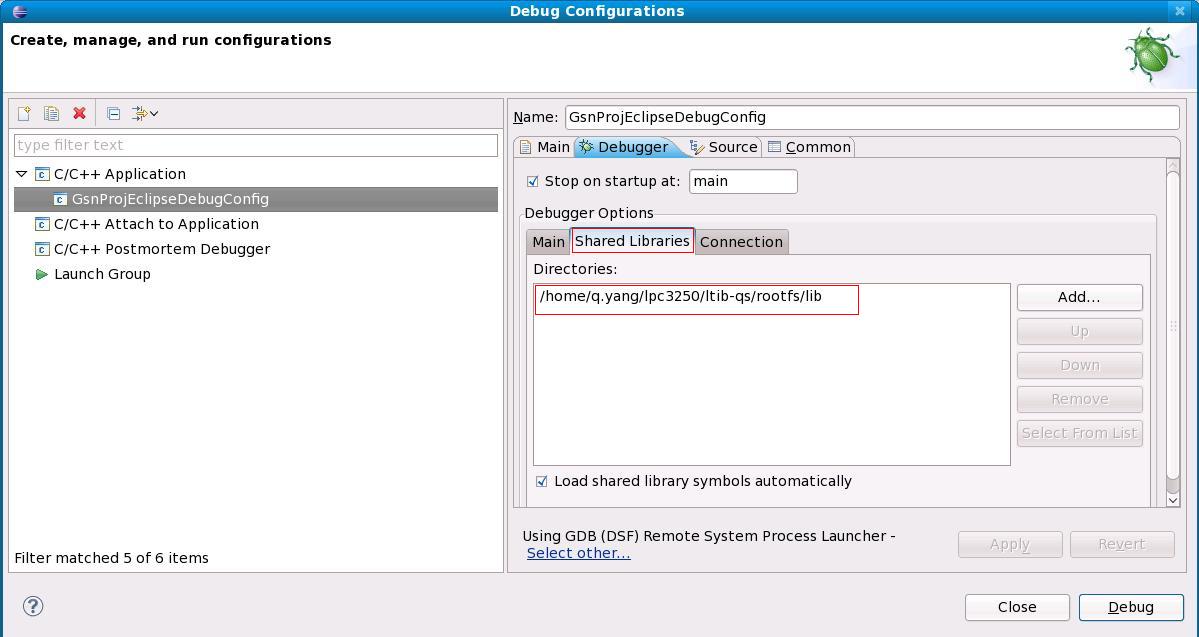
Set up Debugger Options -> Shared Libraries as shown in this screen shot (LTIB lib)


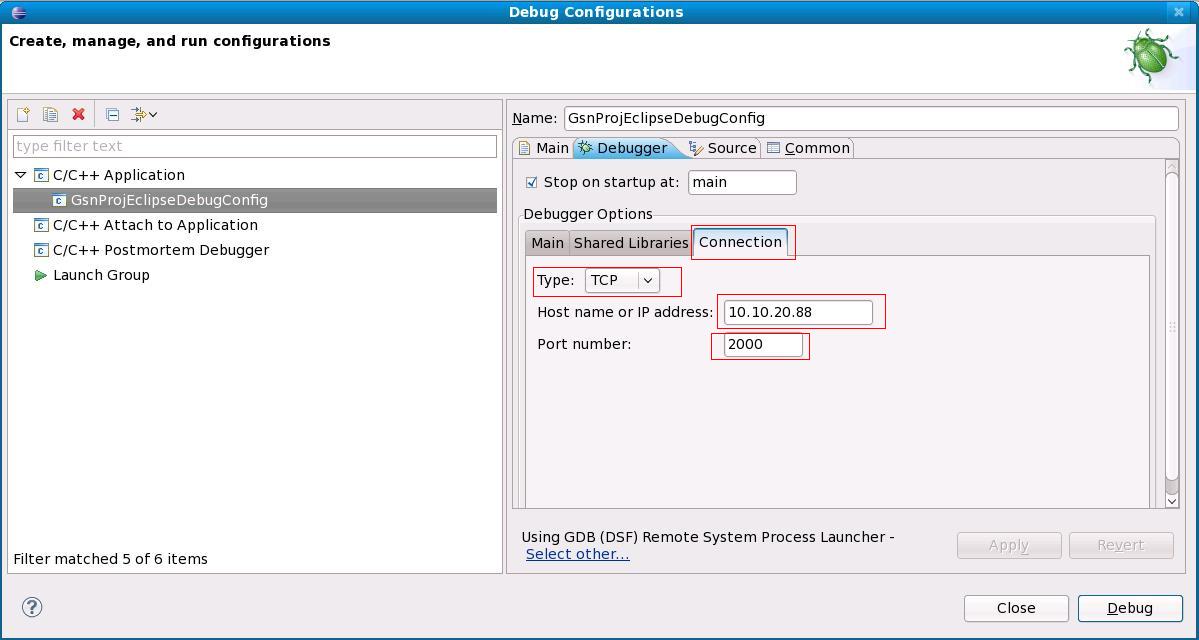
Set up Debugger Options -> Connection as shown in this screen shot (via Ethernet to target board phytec 3250)


7. Done. You would be able to do single step debugging now.
--------------------------------------------------------------
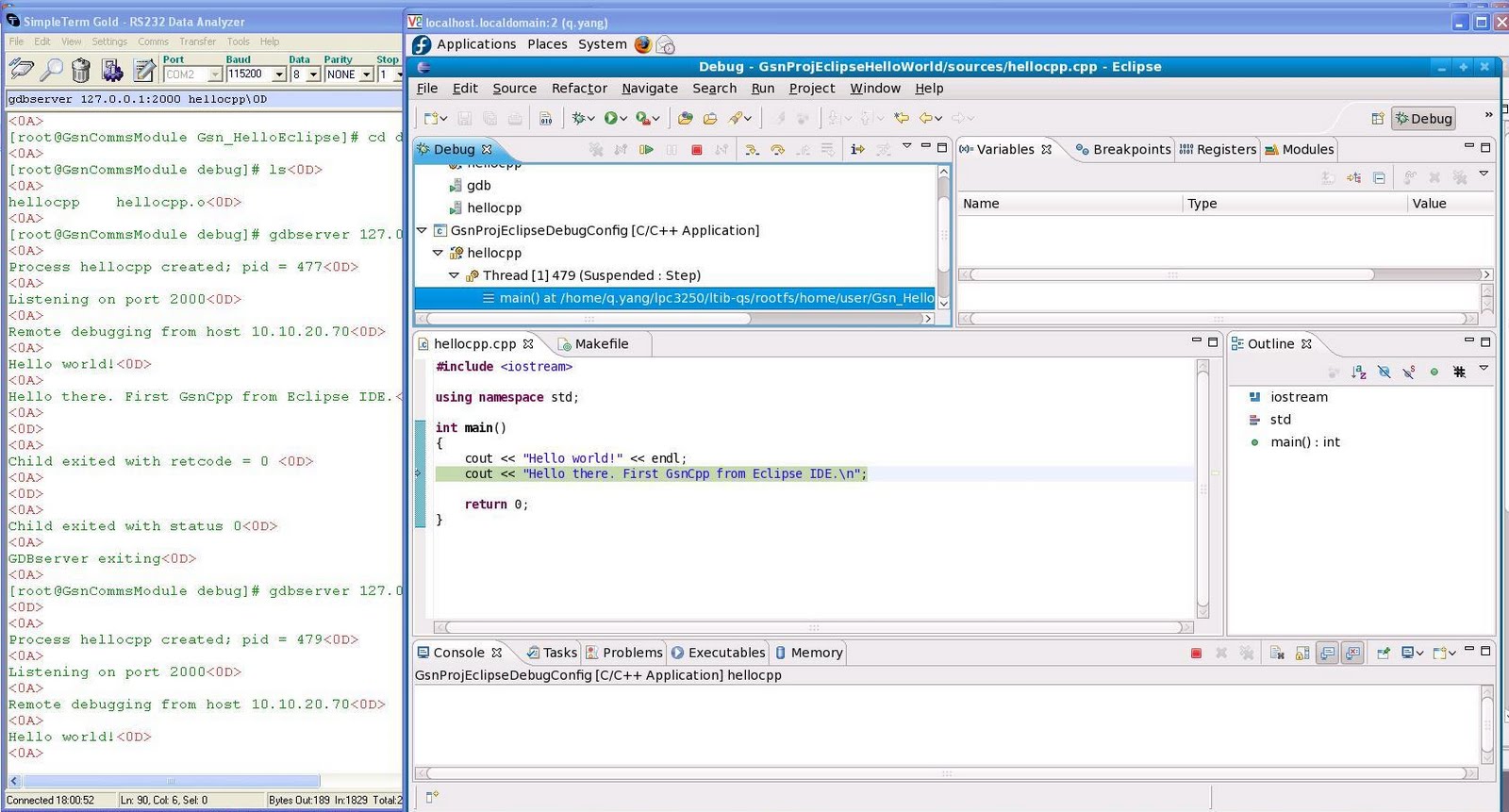
As shown in this screen shot:

[root@GsnCommsModule debug]# gdbserver 127.0.0.1:2000 hellocpp
Process hellocpp created; pid = 501
Listening on port 2000
Remote debugging from host 10.10.20.70
Hello world!
Hello there. First GsnCpp from Eclipse IDE.
Child exited with retcode = 0
Child exited with status 0
GDBserver exiting

Compiler Linker Libraries for Embedded Linux

[1] Kernel Org about Libc
[2] GNU C Library - GLIBC


From libc.info and Coreutils.info
-----------------------------------
unlink,
rename,


if (stat("/dev/ttyUSB3",&buf)==0) {
//3G modem present
Misc::debug_print((GSN_S8*)"3G modem detected",GSN_LOG_INFO);
Misc::debug_print((GSN_S8*)"Killing pppd (if already running)",GSN_LOG_INFO);
if (system("killall pppd")==0) {
sleep(10);
GPIO_CMM_LNK_OFF;
}
rc = pthread_create(&pppthread, NULL, runpppd, &threadarg);
if (rc == 0) {
Misc::debug_print((GSN_S8*)"ppp thread created, sleeping to allow connection",GSN_LOG_INFO);
sleep(30);
} else {
Misc::debug_print((GSN_S8*)"failed to create ppp thread\n",GSN_LOG_INFO);
exit(1);
}
if (CommsLinkSessionMgr::isPPPConnectionAvailabe()) {
GPIO_CMM_LNK_ON;
} else {
GPIO_CMM_LNK_OFF;
}
}


1. Available Libraries.
-------------------------------------
A. Glibc
From: http://en.wikipedia.org/wiki/Glibc
The GNU C Library, commonly known as glibc, is the C standard library released by the GNU Project. Originally written by the Free Software Foundation (FSF) for the GNU operating system, the library's development has been overseen by a committee since 2001,[2] with Ulrich Drepper from Red Hat as the lead contributor and maintainer.

Released under the GNU Lesser General Public License, glibc is free software.

B. uClibc
From: http://en.wikipedia.org/wiki/UClibc
In computing, uClibc is a small C standard library intended for embedded Linux systems. uClibc was created to support uClinux, a version of Linux not requiring a memory management unit and thus suited for microcontrollers (uCs; the "u" is a romanization of μ for "micro").[2]

Development on uClibc started around 1999.[3] uClibc was mostly written from scratch,[4] but has incorporated code from glibc and other projects.[5]


COMPILER LINKER TOOL CHAIN PATH IN LTIB
------------------------------------------------------
[q.yang@localhost ~]$ tree /opt/nxp/ -L 2
/opt/nxp/
`-- gcc-3.4.5-glibc-2.3.6
`-- arm-linux-gnu

[q.yang@localhost ~]$ tree /opt/freescale/ -L 4
/opt/freescale/
`-- usr
`-- local
`-- gcc-4.1.2-glibc-2.5-nptl-3
`-- arm-none-linux-gnueabi


[q.yang@localhost ~]$ tree CodeSourcery/ -L 3
CodeSourcery/
`-- arm-2010q1
|-- arm-none-linux-gnueabi
| |-- bin
| |-- include
| |-- lib
| |-- libc
| `-- share
|-- bin
| |-- arm-none-linux-gnueabi-addr2line
| |-- arm-none-linux-gnueabi-ar
| |-- arm-none-linux-gnueabi-as
| |-- arm-none-linux-gnueabi-c++
| |-- arm-none-linux-gnueabi-c++filt
| |-- arm-none-linux-gnueabi-cpp
| |-- arm-none-linux-gnueabi-g++
| |-- arm-none-linux-gnueabi-gcc
| |-- arm-none-linux-gnueabi-gcc-4.4.1
| |-- arm-none-linux-gnueabi-gcov
| |-- arm-none-linux-gnueabi-gdb
| |-- arm-none-linux-gnueabi-gdbtui
| |-- arm-none-linux-gnueabi-gprof
| |-- arm-none-linux-gnueabi-ld
| |-- arm-none-linux-gnueabi-nm
| |-- arm-none-linux-gnueabi-objcopy
| |-- arm-none-linux-gnueabi-objdump
| |-- arm-none-linux-gnueabi-ranlib
| |-- arm-none-linux-gnueabi-readelf
| |-- arm-none-linux-gnueabi-size
| |-- arm-none-linux-gnueabi-sprite
| |-- arm-none-linux-gnueabi-strings
| `-- arm-none-linux-gnueabi-strip
|-- lib
| `-- gcc
|-- libexec
| |-- arm-none-linux-gnueabi-post-install
| `-- gcc
`-- share
`-- doc


[q.yang@localhost ~]$ tree /opt/nxp/ -L 4
/opt/nxp/
`-- gcc-3.4.5-glibc-2.3.6
`-- arm-linux-gnu
|-- arm-linux-gnu
| |-- bin
| |-- etc
| |-- include
| |-- info
| |-- lib
| |-- libexec
| |-- share
| |-- sys-include
| `-- usr
|-- bin
| |-- arm-linux-gnu-addr2line
| |-- arm-linux-gnu-ar
| |-- arm-linux-gnu-as
| |-- arm-linux-gnu-c++
| |-- arm-linux-gnu-c++filt
| |-- arm-linux-gnu-cpp
| |-- arm-linux-gnu-g++
| |-- arm-linux-gnu-gcc
| |-- arm-linux-gnu-gcc-3.4.5
| |-- arm-linux-gnu-gccbug
| |-- arm-linux-gnu-gcov
| |-- arm-linux-gnu-gprof
| |-- arm-linux-gnu-ld
| |-- arm-linux-gnu-nm
| |-- arm-linux-gnu-objcopy
| |-- arm-linux-gnu-objdump
| |-- arm-linux-gnu-ranlib
| |-- arm-linux-gnu-readelf
| |-- arm-linux-gnu-size
| |-- arm-linux-gnu-strings
| |-- arm-linux-gnu-strip
| `-- fix-embedded-paths
|-- distributed
| |-- arm-linux-gnu -> ../arm-linux-gnu
| |-- bin
| |-- include -> ../include
| |-- info -> ../info
| |-- lib -> ../lib
| |-- libexec -> ../libexec
| `-- man -> ../man
|-- include
| `-- c++
|-- info
|-- lib
| |-- gcc
| `-- libiberty.a
|-- libexec
| `-- gcc
|-- man
| |-- man1
| `-- man7
`-- tmp


[q.yang@localhost ~]$ tree /opt/freescale/ -L 6
/opt/freescale/
`-- usr
`-- local
`-- gcc-4.1.2-glibc-2.5-nptl-3
`-- arm-none-linux-gnueabi
|-- arm-none-linux-gnueabi
| |-- bin
| |-- lib
| `-- sysroot
|-- bin
| |-- arm-none-linux-gnueabi-addr2line
| |-- arm-none-linux-gnueabi-ar
| |-- arm-none-linux-gnueabi-as
| |-- arm-none-linux-gnueabi-c++
| |-- arm-none-linux-gnueabi-c++filt
| |-- arm-none-linux-gnueabi-cpp
| |-- arm-none-linux-gnueabi-g++
| |-- arm-none-linux-gnueabi-gcc
| |-- arm-none-linux-gnueabi-gcc-4.1.2
| |-- arm-none-linux-gnueabi-gccbug
| |-- arm-none-linux-gnueabi-gcov
| |-- arm-none-linux-gnueabi-gprof
| |-- arm-none-linux-gnueabi-ld
| |-- arm-none-linux-gnueabi-nm
| |-- arm-none-linux-gnueabi-objcopy
| |-- arm-none-linux-gnueabi-objdump
| |-- arm-none-linux-gnueabi-ranlib
| |-- arm-none-linux-gnueabi-readelf
| |-- arm-none-linux-gnueabi-size
| |-- arm-none-linux-gnueabi-strings
| `-- arm-none-linux-gnueabi-strip
|-- include
| `-- c++
|-- info
|-- lib
| |-- gcc
| `-- libiberty.a
|-- libexec
| `-- gcc
|-- man
| |-- man1
| `-- man7
|-- share
`-- tmp

Wednesday, July 21, 2010

Installation of CodeSourcery Tool Chain for ARM.

Check Available targets for current GDB installation
-------------------------------------------------------
[q.yang@localhost Download]$ gdb help target
GNU gdb Fedora (6.8-24.fc9)
Copyright (C) 2008 Free Software Foundation, Inc.
License GPLv3+: GNU GPL version 3 or later
This is free software: you are free to change and redistribute it.
There is NO WARRANTY, to the extent permitted by law. Type "show copying"
and "show warranty" for details.
This GDB was configured as "i386-redhat-linux-gnu"...
help: No such file or directory.
/home/q.yang/Download/target: No such file or directory.
(gdb) quit


INSTALL CODE SOURCERY COMPILER AND DEBUGGER
-------------------------------------------------------
[q.yang@localhost FromCodeSourcery]$ bunzip2 arm-2010q1-202-arm-none-linux-gnueabi-i686-pc-linux-gnu.tar.bz2

[q.yang@localhost FromCodeSourcery]$ mkdir -p ~/CodeSourcery
[q.yang@localhost FromCodeSourcery]$ cd ~/CodeSourcery/

[q.yang@localhost CodeSourcery]$ tar xf ~/Download/FromCodeSourcery/arm-2010q1-202-arm-none-linux-gnueabi-i686-pc-linux-gnu.tar

---Add $HOME/CodeSourcery/arm-2010q1/bin and ... into $PATH and $MANPATH------
[q.yang@localhost arm-2010q1]$ cat ~/.bash_profile

CODE_SRCERY_PATH=$HOME/CodeSourcery/arm-2010q1/bin

PATH=$PATH:$HOME/bin:/sbin:/usr/sbin:/opt/wx/2.8/bin:$LTIB_TOOL_CHAIN_FREESCALE_PATH:/opt/codeblocks20100721-svn/bin/:$CODE_SRCERY_PATH

MANPATH=$MANPATH:$HOME/CodeSourcery/arm-2010q1/share/doc/sourceryg++-arm-none-linux-gnueabi/man

VERIFY THE CODE SOURCERY TOOL CHAIN INSTALLATION
---------------------------------------------------
[q.yang@localhost arm-2010q1]$ arm-none-linux-gnueabi-g++ -v
Using built-in specs.
Target: arm-none-linux-gnueabi
Configured with: /scratch/julian/2010q1-release-linux-lite/src/gcc-4.4-2010q1/configure --build=i686-pc-linux-gnu --host=i686-pc-linux-gnu --target=arm-none-linux-gnueabi --enable-threads --disable-libmudflap --disable-libssp --disable-libstdcxx-pch --enable-extra-sgxxlite-multilibs --with-arch=armv5te --with-gnu-as --with-gnu-ld --with-specs='%{funwind-tables|fno-unwind-tables|mabi=*|ffreestanding|nostdlib:;:-funwind-tables} %{O2:%{!fno-remove-local-statics: -fremove-local-statics}} %{O*:%{O|O0|O1|O2|Os:;:%{!fno-remove-local-statics: -fremove-local-statics}}}' --enable-languages=c,c++ --enable-shared --disable-lto --enable-symvers=gnu --enable-__cxa_atexit --with-pkgversion='Sourcery G++ Lite 2010q1-202' --with-bugurl=https://support.codesourcery.com/GNUToolchain/ --disable-nls --prefix=/opt/codesourcery --with-sysroot=/opt/codesourcery/arm-none-linux-gnueabi/libc --with-build-sysroot=/scratch/julian/2010q1-release-linux-lite/install/arm-none-linux-gnueabi/libc --with-gmp=/scratch/julian/2010q1-release-linux-lite/obj/host-libs-2010q1-202-arm-none-linux-gnueabi-i686-pc-linux-gnu/usr --with-mpfr=/scratch/julian/2010q1-release-linux-lite/obj/host-libs-2010q1-202-arm-none-linux-gnueabi-i686-pc-linux-gnu/usr --with-ppl=/scratch/julian/2010q1-release-linux-lite/obj/host-libs-2010q1-202-arm-none-linux-gnueabi-i686-pc-linux-gnu/usr --with-host-libstdcxx='-static-libgcc -Wl,-Bstatic,-lstdc++,-Bdynamic -lm' --with-cloog=/scratch/julian/2010q1-release-linux-lite/obj/host-libs-2010q1-202-arm-none-linux-gnueabi-i686-pc-linux-gnu/usr --disable-libgomp --enable-poison-system-directories --with-build-time-tools=/scratch/julian/2010q1-release-linux-lite/install/arm-none-linux-gnueabi/bin --with-build-time-tools=/scratch/julian/2010q1-release-linux-lite/install/arm-none-linux-gnueabi/bin
Thread model: posix
gcc version 4.4.1 (Sourcery G++ Lite 2010q1-202)


CodeSourcery 32 bits version won't work under Fedora20 unless install glibc.i686 32bits glibc library.
[root@fedora20 q.yang]# yum install glibc.i686

[q.yang@fedora20 ~]$ arm-none-linux-gnueabi-g++ -v
Using built-in specs.
Target: arm-none-linux-gnueabi
Configured with: /scratch/julian/2010q1-release-linux-lite/src/gcc-4.4-2010q1/configure --build=i686-pc-linux-gnu --host=i686-pc-linux-gnu --target=arm-none-linux-gnueabi --enable-threads --disable-libmudflap --disable-libssp --disable-libstdcxx-pch --enable-extra-sgxxlite-multilibs --with-arch=armv5te --with-gnu-as --with-gnu-ld --with-specs='%{funwind-tables|fno-unwind-tables|mabi=*|ffreestanding|nostdlib:;:-funwind-tables} %{O2:%{!fno-remove-local-statics: -fremove-local-statics}} %{O*:%{O|O0|O1|O2|Os:;:%{!fno-remove-local-statics: -fremove-local-statics}}}' --enable-languages=c,c++ --enable-shared --disable-lto --enable-symvers=gnu --enable-__cxa_atexit --with-pkgversion='Sourcery G++ Lite 2010q1-202' --with-bugurl=https://support.codesourcery.com/GNUToolchain/ --disable-nls --prefix=/opt/codesourcery --with-sysroot=/opt/codesourcery/arm-none-linux-gnueabi/libc --with-build-sysroot=/scratch/julian/2010q1-release-linux-lite/install/arm-none-linux-gnueabi/libc --with-gmp=/scratch/julian/2010q1-release-linux-lite/obj/host-libs-2010q1-202-arm-none-linux-gnueabi-i686-pc-linux-gnu/usr --with-mpfr=/scratch/julian/2010q1-release-linux-lite/obj/host-libs-2010q1-202-arm-none-linux-gnueabi-i686-pc-linux-gnu/usr --with-ppl=/scratch/julian/2010q1-release-linux-lite/obj/host-libs-2010q1-202-arm-none-linux-gnueabi-i686-pc-linux-gnu/usr --with-host-libstdcxx='-static-libgcc -Wl,-Bstatic,-lstdc++,-Bdynamic -lm' --with-cloog=/scratch/julian/2010q1-release-linux-lite/obj/host-libs-2010q1-202-arm-none-linux-gnueabi-i686-pc-linux-gnu/usr --disable-libgomp --enable-poison-system-directories --with-build-time-tools=/scratch/julian/2010q1-release-linux-lite/install/arm-none-linux-gnueabi/bin --with-build-time-tools=/scratch/julian/2010q1-release-linux-lite/install/arm-none-linux-gnueabi/bin
Thread model: posix
gcc version 4.4.1 (Sourcery G++ Lite 2010q1-202)


Alternatively, download install latest 64bits CodeSouercery (called CodeBench ) from Mentor, it'll work with 64bits glibc library.
amd-2014.05-25-x86_64-amd-linux-gnu-i686-pc-linux-gnu.tar


Tuesday, July 20, 2010

Install Code::Blocks in Fedora 9.

Ref [1] http://wiki.codeblocks.org/index.php?title=Installing_Code::Blocks_from_source_on_Linux
Ref [2] http://www.friendlyarm.net/forum/topic/26


1.
-------------------------------
[q.yang@localhost ~]$ mkdir ~/devel

2.Checking the presence of GTK+ library
---------------------------------------
[q.yang@localhost ~]$ rpm -qa |grep gtk
pygtk2-codegen-2.12.1-6.fc9.i386
gtk-nodoka-engine-0.7.1-2.fc9.i386
gtk-doc-1.9-4.fc9.noarch
authconfig-gtk-5.4.4-1.fc9.i386
gtkmm24-2.12.7-1.fc9.i386
gtksourceview2-2.2.2-1.fc9.i386
gtkhtml2-2.11.1-3.fc9.i386
pygtk2-doc-2.12.1-6.fc9.i386
pygtksourceview-2.2.0-1.fc9.i386
usermode-gtk-1.98-1.fc9.i386
gtk2-engines-2.14.3-1.fc9.i386
gnome-python2-gtkhtml2-2.19.1-28.fc9.i386
gtk2-2.12.12-2.fc9.i386
gtkspell-2.0.11-8.fc9.i386
gtk-sharp2-2.12.1-1.fc9.i386
GConf2-gtk-2.22.0-1.fc9.i386
pygtk2-libglade-2.12.1-6.fc9.i386
pygtk2-2.12.1-6.fc9.i386
xdg-user-dirs-gtk-0.7-1.fc9.i386
pygtk2-devel-2.12.1-6.fc9.i386
gtkhtml3-3.18.3-1.fc9.i386
gtk2-devel-2.12.12-2.fc9.i386
[q.yang@localhost ~]$ ll /usr/lib/ | grep libgtk
lrwxrwxrwx 1 root root 21 2010-06-04 02:47 libgtkhtml-2.so.0 -> libgtkhtml-2.so.0.0.0
-rwxr-xr-x 1 root root 451304 2008-02-10 14:34 libgtkhtml-2.so.0.0.0
lrwxrwxrwx 1 root root 25 2010-06-07 18:04 libgtkhtml-3.14.so.19 -> libgtkhtml-3.14.so.19.1.0
-rwxr-xr-x 1 root root 764296 2008-06-30 21:58 libgtkhtml-3.14.so.19.1.0
lrwxrwxrwx 1 root root 22 2010-06-07 17:50 libgtkmm-2.4.so.1 -> libgtkmm-2.4.so.1.0.30
-rwxr-xr-x 1 root root 3446444 2008-04-12 22:43 libgtkmm-2.4.so.1.0.30
-rwxr-xr-x 1 root root 24160 2008-09-20 19:23 libgtksharpglue-2.so
lrwxrwxrwx 1 root root 29 2010-06-07 17:50 libgtksourceview-2.0.so.0 -> libgtksourceview-2.0.so.0.0.0
-rwxr-xr-x 1 root root 264908 2008-07-02 01:00 libgtksourceview-2.0.so.0.0.0
lrwxrwxrwx 1 root root 20 2010-06-04 02:36 libgtkspell.so.0 -> libgtkspell.so.0.0.0
-rwxr-xr-x 1 root root 21540 2008-02-10 14:29 libgtkspell.so.0.0.0
lrwxrwxrwx 1 root root 27 2010-06-07 18:23 libgtk-x11-2.0.so -> libgtk-x11-2.0.so.0.1200.12
lrwxrwxrwx 1 root root 27 2010-06-07 17:47 libgtk-x11-2.0.so.0 -> libgtk-x11-2.0.so.0.1200.12
-rwxr-xr-x 1 root root 4233032 2008-11-21 19:06 libgtk-x11-2.0.so.0.1200.12

3. Checking the presence of libwxGTK library
---------------------------------------
A. Download source if not installed or no yum rpm package available.

[q.yang@localhost ~]$ cd devel/
[q.yang@localhost devel]$ ll
-rw-rw-r-- 1 q.yang q.yang 13078779 2010-07-21 16:27 wxGTK-2.8.11.tar.gz

[q.yang@localhost devel]$ tar zxf wxGTK-2.8.11.tar.gz
[q.yang@localhost devel]$ cd wxGTK-2.8.11

B. Config, compile and install.

[q.yang@localhost wxGTK-2.8.11]$ mkdir build_gtk2_shared_monolithic_unicode
[q.yang@localhost wxGTK-2.8.11]$ cd build_gtk2_shared_monolithic_unicode/
[q.yang@localhost build_gtk2_shared_monolithic_unicode]$ ../configure --prefix=/opt/wx/2.8 \
> --enable-xrc \
> --enable-monolithic \
> --enable-unicode

......................
..................
config.status: creating contrib/src/net/Makefile
config.status: creating lib/wx/include/gtk2-unicode-release-2.8/wx/setup.h
config.status: executing wx-config commands

Configured wxWidgets 2.8.11 for `i686-pc-linux-gnu'

Which GUI toolkit should wxWidgets use? GTK+ 2 with support for gnomeprint
Should wxWidgets be compiled into single library? yes
Should wxWidgets be compiled in debug mode? no
Should wxWidgets be linked as a shared library? yes
Should wxWidgets be compiled in Unicode mode? yes
What level of wxWidgets compatibility should be enabled?
wxWidgets 2.4 no
wxWidgets 2.6 yes
Which libraries should wxWidgets use?
jpeg sys
png sys
regex builtin
tiff sys
zlib sys
odbc no
expat sys
libmspack no
sdl no


[q.yang@localhost build_gtk2_shared_monolithic_unicode]$ make
[root@localhost build_gtk2_shared_monolithic_unicode]# make install
...................................................................
...................................................................
if test ! -d /opt/wx/2.8/include/wx-2.8/`dirname $f` ; then \
/usr/bin/install -c -d /opt/wx/2.8/include/wx-2.8/`dirname $f`; \
fi; \
/usr/bin/install -c -m 644 ../include/$f /opt/wx/2.8/include/wx-2.8/$f; \
done

------------------------------------------------------

The installation of wxWidgets is finished. On certain
platforms (e.g. Linux) you'll now have to run ldconfig
if you installed a shared library and also modify the
LD_LIBRARY_PATH (or equivalent) environment variable.

wxWidgets comes with no guarantees and doesn't claim
to be suitable for any purpose.

Read the wxWidgets Licence on licencing conditions.

------------------------------------------------------

C. Added /opt/wx/2.8/bin into $PATH

[q.yang@localhost build_gtk2_shared_monolithic_unicode]$ vi ~/.bash_profile
[q.yang@localhost build_gtk2_shared_monolithic_unicode]$ source ~/.bash_profile
[q.yang@localhost build_gtk2_shared_monolithic_unicode]$ echo $PATH
/usr/lib/qt-3.3/bin:/usr/kerberos/bin:/usr/lib/ccache:/usr/local/bin:/bin:/usr/bin:/home/q.yang/bin:/sbin:/usr/sbin:/home/q.yang/j2sdk1.4.2_12/bin:/home/q.yang/j2sdk1.4.2_12/jre/bin:/home/q.yang/eclipse_workspace/MyMacProj/bin:/home/q.yang/bin:/sbin:/usr/sbin:/opt/wx/2.8/bin:/home/q.yang/j2sdk1.4.2_12/bin:/home/q.yang/j2sdk1.4.2_12/jre/bin:/home/q.yang/eclipse_workspace/MyMacProj/bin

D. Some extra changes.

[root@localhost build_gtk2_shared_monolithic_unicode]# vi /etc/ld.so.conf
[root@localhost build_gtk2_shared_monolithic_unicode]# exit
exit
[q.yang@localhost build_gtk2_shared_monolithic_unicode]$ cat /etc/ld.so.conf
include ld.so.conf.d/*.conf
include /opt/wx/2.8/lib

[root@localhost build_gtk2_shared_monolithic_unicode]# ldconfig

[q.yang@localhost build_gtk2_shared_monolithic_unicode]$ wx-config --prefix
/opt/wx/2.8
[q.yang@localhost build_gtk2_shared_monolithic_unicode]$ wx-config --libs
-L/opt/wx/2.8/lib -pthread -lwx_gtk2u-2.8
[q.yang@localhost build_gtk2_shared_monolithic_unicode]$ which wx-config
/opt/wx/2.8/bin/wx-config


4. Getting Code::Blocks sources
---------------------------------------------------------------

[q.yang@localhost devel]$ svn checkout svn://svn.berlios.de/codeblocks/trunk
.....................................
...................................
A trunk/TODO
A trunk/codeblocks.spec.in
A trunk/acinclude.m4
A trunk/codeblocks.plist.in
A trunk/COPYING
A trunk/Makefile.am
A trunk/update_revision.sh
A trunk/NEWS
A trunk/bootstrap
A trunk/codeblocks.pc.in
A trunk/README.debian
Checked out revision 6411.

[q.yang@localhost trunk]$ ./bootstrap
...............................
configure.in:77: error: possibly undefined macro: AM_OPTIONS_WXCONFIG
If this token and others are legitimate, please use m4_pattern_allow.
See the Autoconf documentation.
configure.in:78: error: possibly undefined macro: AM_PATH_WXCONFIG

[root@localhost trunk]# echo `wx-config --prefix`/share/aclocal >> /usr/share/aclocal/dirlist

[q.yang@localhost trunk]$ ./bootstrap THIS TIME IT'LL HAVE NO ERROR.

5. Install code:block
---------------------------------------
[q.yang@localhost trunk]$ ./configure ALL INSTALLATION WILL BE USING DEFAULT SETTING.

[q.yang@localhost trunk]$./configure --prefix=/opt/codeblocks20100721-svn --with-contrib-plugins=all
......................................
config.status: creating src/include/config.h
config.status: src/include/config.h is unchanged
config.status: executing depfiles commands
*************************************************
* Code::Blocks source tree has been configured. *
*************************************************
You can now build Code::Blocks by issuing 'make'.
When the build is complete, become root and install
it by issuing 'make install'.

[q.yang@localhost trunk]$ make

........error occurred during make ..... in particular in /plug-in/...


[root@localhost trunk]# make install

.............................

PATH="$PATH:/sbin" ldconfig -n /opt/codeblocks20100721-svn/lib/wxSmithContribItems
----------------------------------------------------------------------
Libraries have been installed in:
/opt/codeblocks20100721-svn/lib/wxSmithContribItems

If you ever happen to want to link against installed libraries
in a given directory, LIBDIR, you must either use libtool, and
specify the full pathname of the library, or use the `-LLIBDIR'
flag during linking and do at least one of the following:
- add LIBDIR to the `LD_LIBRARY_PATH' environment variable
during execution
- add LIBDIR to the `LD_RUN_PATH' environment variable
during linking
- use the `-Wl,--rpath -Wl,LIBDIR' linker flag
- have your system administrator add LIBDIR to `/etc/ld.so.conf'

See any operating system documentation about shared libraries for
more information, such as the ld(1) and ld.so(8) manual pages.
----------------------------------------------------------------------
....................................

CParser.cpp:111: error: 'preprocessor' was not declared in this scope
CParser.cpp:115: error: 'comment' was not declared in this scope
CParser.cpp:119: error: 'special_w' was not declared in this scope
CParser.cpp:145: error: 'parse_info' was not declared in this scope
CParser.cpp:145: error: expected primary-expression before 'const'
CParser.cpp:145: error: expected `;' before 'const'
CParser.cpp:151: error: 'info' was not declared in this scope
make[4]: *** [CParser.lo] Error 1
make[4]: Leaving directory `/home/q.yang/devel/trunk/src/plugins/contrib/NassiShneiderman'
make[3]: *** [install-recursive] Error 1
make[3]: Leaving directory `/home/q.yang/devel/trunk/src/plugins/contrib'
make[2]: *** [install-recursive] Error 1
make[2]: Leaving directory `/home/q.yang/devel/trunk/src/plugins'
make[1]: *** [install-recursive] Error 1
make[1]: Leaving directory `/home/q.yang/devel/trunk/src'
make: *** [install-recursive] Error 1


6. Last thing to do before running code:blocks
-------------------------------------------------------
[q.yang@localhost trunk]$ /opt/codeblocks20100721-svn/bin/codeblocks
/opt/codeblocks20100721-svn/bin/codeblocks: error while loading shared libraries: libwx_gtk2u-2.8.so.0: cannot open shared object file: No such file or directory

[root@localhost trunk]# vi /etc/ld.so.conf
[root@localhost trunk]# ldconfig

[q.yang@localhost trunk]$ cat /etc/ld.so.conf
include ld.so.conf.d/*.conf
/opt/wx/2.8/lib
/opt/codeblocks20100721-svn/lib


7. DONE ---- Code::blocks can be started now
--------------------------------------------------
[q.yang@localhost trunk]$ /opt/codeblocks20100721-svn/bin/codeblocks
Initialize EditColourSet .....
Initialize EditColourSet: done.


8. Set Compiler to use LTIB arm tool Chain
----------------------------------------------
Code:Blocks svn build rev 6411

1. navigate to home/username and edit .bash_profile

LTIB_TOOL_CHAIN_FREESCALE_PATH=/opt/freescale/usr/local/gcc-4.1.2-glibc-2.5-nptl-3/arm-none-linux-gnueabi

PATH=$PATH:$HOME/bin:/sbin:/usr/sbin:/opt/wx/2.8/bin:$LTIB_TOOL_CHAIN_FREESCALE_PATH:/opt/codeblocks20100721-svn/bin/

2. $source .bash_profile
3. Go to Settings/Compiler and debugger and in Select compiler find GNU
ARM GCC compiler, select it and Set as default or it reverts to GNU GCC
Compiler everytime you start a new project
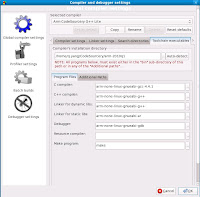
4. in the tab Toolchain executables (make sure this window is maximised or
you don’t see this tab!) and Compiler’s installation directory put
/opt/freescale/usr/local/gcc-4.1.2-glibc-2.5-nptl-3/arm-none-linux-gnueabi (bin not necessary)
5. now in the Program Files window:

manually select and map the c/c++ compiler, linker with actual 'commands'

C compiler arm-none-linux-gnueabi-gcc-4.1.2
C++ compiler arm-none-linux-gnueabi-g++
Linker for dynamic libs arm-none-linux-gnueabi-gcc-g++
Linker for static libs arm-none-linux-gnueabi-ar
Debugger gdb (Make sure [*] cross gdb (runs on build machine) ticked in LTIB, so that u can find gdb in ~/lpc3250/ltib-qs/bin/ )
make program make

Then add /usr/bin/ into addtional path so that compiler can find where is 'make' command.


Successfully passed GDB debugging after adding and enabling [*]cross gdb Tool Chain in LTIB, and configured it in Code blocks(/ltib-qs/bin/gdb). Here's the screen shot when using LTIB tool chain for debugging.


Successfully passed GDB debugging after intalling CodeSourcery Tool Chain, and configured it in Code blocks. Here's the screen shot when using code sourcery.


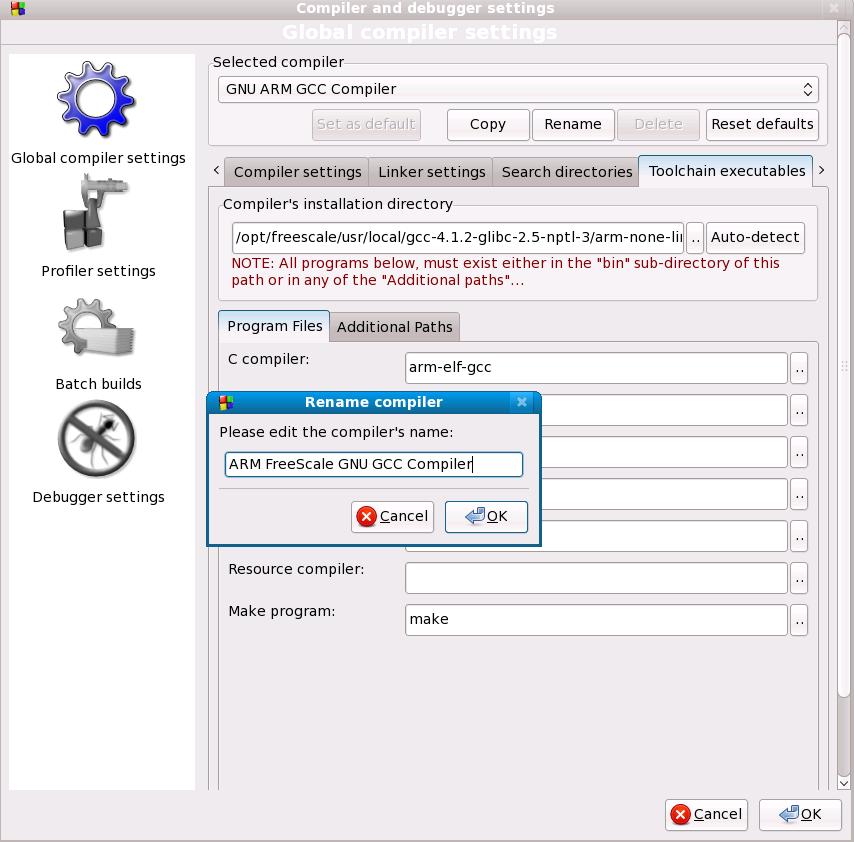
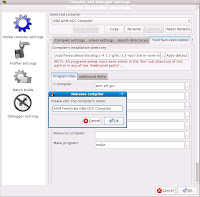
To make it easy to identify, you can rename the compiler

FW: Six Popular IDEs For Developing Software in C/C++ on Windows Platform

http://beans.seartipy.com/2006/12/31/six-popular-ides-for-developing-software-in-cc-on-windows-platform/


Six Popular IDEs For Developing Software in C/C++ on Windows Platform