Showing posts with label Linux Fedora. Show all posts

Friday, August 22, 2014

Install Google chrome in Fedora20

[1]   http://www.if-not-true-then-false.com/2010/install-google-chrome-with-yum-on-fedora-red-hat-rhel/

cat << EOF > /etc/yum.repos.d/google-chrome.repo
[google-chrome]
name=google-chrome - \$basearch
baseurl=http://dl.google.com/linux/chrome/rpm/stable/\$basearch
enabled=1
gpgcheck=1
gpgkey=https://dl-ssl.google.com/linux/linux_signing_key.pub
EOF

#yum install google-chrome-stable

-Start chrome
$google-chrome


Install GNOME Weather in Fedora 20


[1] http://askubuntu.com/questions/302590/how-to-install-a-clock-or-weather-application-with-gnome-3-8
[2] http://fedoraftw.com/enjoy-weather-data-fedora-20-polished-gnome-weather


-Install gnome-weather with root account

# yum install gnome-weather

...........
  Installing : gnome-weather-3.10.1-1.fc20.x86_64                           1/1
  Verifying  : gnome-weather-3.10.1-1.fc20.x86_64                           1/1

Installed:
  gnome-weather.x86_64 0:3.10.1-1.fc20                                         

Complete!


-Start gnome-weather

$gnome-weather


Wednesday, June 11, 2014

Enable SSH service in Fedora20 in command line


[root@fedora20 SandBoxPython]# systemctl enable sshd.service
ln -s '/usr/lib/systemd/system/sshd.service' '/etc/systemd/system/multi-user.target.wants/sshd.service'
[root@fedora20 SandBoxPython]# systemctl restart sshd.service

Friday, August 5, 2011

Install Java SE JDK6 under Fedora 9

[1] http://www.oracle.com/technetwork/java/javase/install-linux-rpm-137089.html
[2] http://fedoraunity.org/Members/zcat/using-sun-java-instead-of-openjdk

[q.yang@localhost Download]$ ./jdk-6u26-linux-i586-rpm.bin
[q.yang@localhost Download]$ ./jdk-6u26-linux-i586-rpm.bin
Unpacking...
Checksumming...
Extracting...
UnZipSFX 5.50 of 17 February 2002, by Info-ZIP (Zip-Bugs@lists.wku.edu).
inflating: jdk-6u26-linux-i586.rpm
inflating: sun-javadb-common-10.6.2-1.1.i386.rpm
inflating: sun-javadb-core-10.6.2-1.1.i386.rpm
inflating: sun-javadb-client-10.6.2-1.1.i386.rpm
inflating: sun-javadb-demo-10.6.2-1.1.i386.rpm
inflating: sun-javadb-docs-10.6.2-1.1.i386.rpm
inflating: sun-javadb-javadoc-10.6.2-1.1.i386.rpm
error: can't create transaction lock on /var/lib/rpm/__db.000
Installing JavaDB
error: can't create transaction lock on /var/lib/rpm/__db.000

Done.
[q.yang@localhost Download]$ su
Password:
[root@localhost Download]# ./jdk-6u26-linux-i586-rpm.bin
Unpacking...
Checksumming...
Extracting...
UnZipSFX 5.50 of 17 February 2002, by Info-ZIP (Zip-Bugs@lists.wku.edu).
replace jdk-6u26-linux-i586.rpm? [y]es, [n]o, [A]ll, [N]one, [r]ename: y
inflating: jdk-6u26-linux-i586.rpm
replace sun-javadb-common-10.6.2-1.1.i386.rpm? [y]es, [n]o, [A]ll, [N]one, [r]ename: y
inflating: sun-javadb-common-10.6.2-1.1.i386.rpm
replace sun-javadb-core-10.6.2-1.1.i386.rpm? [y]es, [n]o, [A]ll, [N]one, [r]ename: y
inflating: sun-javadb-core-10.6.2-1.1.i386.rpm
replace sun-javadb-client-10.6.2-1.1.i386.rpm? [y]es, [n]o, [A]ll, [N]one, [r]ename: y
inflating: sun-javadb-client-10.6.2-1.1.i386.rpm
replace sun-javadb-demo-10.6.2-1.1.i386.rpm? [y]es, [n]o, [A]ll, [N]one, [r]ename: y
inflating: sun-javadb-demo-10.6.2-1.1.i386.rpm
replace sun-javadb-docs-10.6.2-1.1.i386.rpm? [y]es, [n]o, [A]ll, [N]one, [r]ename: y
inflating: sun-javadb-docs-10.6.2-1.1.i386.rpm
replace sun-javadb-javadoc-10.6.2-1.1.i386.rpm? [y]es, [n]o, [A]ll, [N]one, [r]ename: A
inflating: sun-javadb-javadoc-10.6.2-1.1.i386.rpm
Preparing... ########################################### [100%]
1:jdk ########################################### [100%]
Unpacking JAR files...
rt.jar...
jsse.jar...
charsets.jar...
tools.jar...
localedata.jar...
plugin.jar...
javaws.jar...
deploy.jar...
Installing JavaDB
Preparing... ########################################### [100%]
1:sun-javadb-common ########################################### [ 17%]
2:sun-javadb-core ########################################### [ 33%]
3:sun-javadb-client ########################################### [ 50%]
4:sun-javadb-demo ########################################### [ 67%]
5:sun-javadb-docs ########################################### [ 83%]
6:sun-javadb-javadoc ########################################### [100%]

Java(TM) SE Development Kit 6 successfully installed.

Product Registration is FREE and includes many benefits:
* Notification of new versions, patches, and updates
* Special offers on Oracle products, services and training
* Access to early releases and documentation

Product and system data will be collected. If your configuration
supports a browser, the JDK Product Registration form will
be presented. If you do not register, none of this information
will be saved. You may also register your JDK later by
opening the register.html file (located in the JDK installation
directory) in a browser.

For more information on what data Registration collects and
how it is managed and used, see:
http://java.sun.com/javase/registration/JDKRegistrationPrivacy.html

Press Enter to continue.....


Done.
[root@localhost Download]# exit
exit
[q.yang@localhost Download]$ java -version
java version "1.6.0"
OpenJDK Runtime Environment (build 1.6.0-b09)
OpenJDK Client VM (build 1.6.0-b09, mixed mode)
[q.yang@localhost Download]$


CHANGE DEFAULT JDK TO SUN INSTEAD OF OPEN JDK [2]
----------------------------------------------
[q.yang@localhost ~]$ source /etc/profile.d/sunjava.sh
[q.yang@localhost ~]$ echo $PATH
/usr/java/default/bin:/usr/java/default/bin:/usr/kerberos/bin:/usr/lib/ccache:/usr/local/bin:/bin:/usr/bin:/home/q.yang/bin:/sbin:/usr/sbin:/opt/wx/2.8/bin:/opt/freescale/usr/local/gcc-4.1.2-glibc-2.5-nptl-3/arm-none-linux-gnueabi/bin:/opt/codeblocks20100721-svn/bin/:/home/q.yang/CodeSourcery/arm-2010q1/bin:/opt/codeblocks20100721-svn/bin:/home/q.yang/EclipseCDT/eclipse
[q.yang@localhost ~]$ java -version
java version "1.6.0_26"
Java(TM) SE Runtime Environment (build 1.6.0_26-b03)
Java HotSpot(TM) Client VM (build 20.1-b02, mixed mode, sharing)
[q.yang@localhost ~]$ cat /etc/profile.d/sunjava.sh
export JAVA_HOME=/usr/java/default
export PATH=$JAVA_HOME/bin:$PATH

Tuesday, February 22, 2011

System back up using TAR Ball

[1] http://ubuntuforums.org/archive/index.php/t-194938.html
[2] http://www.cyberciti.biz/faq/linux-unix-extracting-specific-files/ --- Untar part of tar ball


EXCLUDE SOME FOLDERS WHEN DOING TAR BALL
--------------------------------------------
[root@localhost media]# tar -cvzpP --file=/mnt/200GSys/backuproot.tar.gz --exclude={/mnt/*,/boot/*,/home/*,/opt/*} /


INCLUDE MULTIPLE FOLDERS WHEN DOING TAR BALL
----------------------------------------------
tar -cvzpP --file=/home/q.yang/$NAME /home/q.yang/CodeSourcery /home/q.yang/devel /home/q.yang/Documents /home/q.yang/Download /home/q.yang/EclipseCDT /home/q.yang/JavaDev /home/q.yang/lpc3250


SAMPLE BACK UP SHELL
-----------------------------
[q.yang@localhost ~]$ cat tar_quentin_home_data.sh

NAME='Linux_Quentin_Home_bkup'_$(date +%g%m%d%H).tar.gz

if [ -f "$NAME" ]
then
echo "File $NAME exist already."
return
fi

touch $NAME

#find . -name "*.java" -mtime -$TimeRange -exec tar -uvf $NAME {} \;
#echo "source files of last $TimeRange days"
#find . -name "*.java" -mtime -$TimeRange -exec ls -all -ct {} \;
echo "tar -cvzpP --file=/home/q.yang/$NAME /home/q.yang/CodeSourcery /home/q.yang/devel /home/q.yang/Documents /home/q.yang/Download /home/q.yang/EclipseCDT /home/q.yang/JavaDev /home/q.yang/lpc3250 /home/q.yang/root_user_cmd_list.txt /home/q.yang/rpmbuild /home/q.yang/tar_quentin_home_data.sh /home/q.yang/.bash_profile /home/q.yang/.bash_history /home/q.yang/.bash_logout"


tar -cvzpP --file=/home/q.yang/$NAME /home/q.yang/CodeSourcery /home/q.yang/devel /home/q.yang/Documents /home/q.yang/Download /home/q.yang/EclipseCDT /home/q.yang/JavaDev /home/q.yang/lpc3250 /home/q.yang/root_user_cmd_list.txt /home/q.yang/rpmbuild /home/q.yang/tar_quentin_home_data.sh /home/q.yang/.bash_profile /home/q.yang/.bash_history /home/q.yang/.bash_logout


SAMPLE OF UNTAR TAR BALL
-----------------------------
[root@localhost q.yang]# cat /home/l.lu/untar_luke_home_usr_data.sh

#NAME='Linux_Luke_Home_Data__bkup'_$(date +%g%m%d%H).tar.gz
NAME=$1
OUTDIR=$2

if [ -f "$NAME" ]
then
echo "About to untar $NAME"
else
echo "File '$NAME' does not exist."
echo ""
echo "Sample running this shell 'untar_luke_home_usr_data.sh':"
echo ""
echo ". untar_luke_home_usr_data.sh Linux_Luke_Home_Data__bkup_$(date +%g%m%d%H).tar.gz"
echo ""
return
fi

mkdir $OUTDIR

echo "tar -xzvf $NAME -C $OUTDIR/"
tar -xzvf $NAME -C $OUTDIR/


ISSUES USING SYSTEM TAR COMMAND
-------------------------------------------------
When tar -xzvf on another Linux machine. I had a many complains of not able to change ownership.

This is one discussion about this issue on 'stackoverflow'.
"how to keep file ownership while using tar"
http://stackoverflow.com/questions/17273798/how-to-keep-file-ownership-while-using-tar

Someone recommended that using pure perl rather than system command to do archive and restore.
Below is a good link of how to use perl to do advance archive and restore.
http://perldoc.perl.org/Archive/Tar.html

Tuesday, November 23, 2010

SSH file transfer

[1] http://www.go2linux.org/scp-linux-command-line-copy-files-over-ssh
[2] http://en.kioskea.net/faq/794-file-transfer-via-ssh
[3] http://www.terminally-incoherent.com/blog/2006/09/23/command-line-scp-for-windows/

[1]
---------------------
Usage
scp [[user@]from-host:]source-file [[user@]to-host:][destination-file]

scp -r miguel@10.1.2.2:/home/miguel/ miguel@10.1.2.3:/home/miguel/

[q.yang@localhost user]$ scp q.yang@10.10.20.70:/home/q.yang/lpc3250/ltib-GsnComms3240/rootfs/home/user/TcpIpCommsTarget root@10.10.20.89:/home/user/
The authenticity of host '10.10.20.70 (10.10.20.70)' can't be established.
RSA key fingerprint is 1b:19:f1:da:bd:28:f7:ac:15:fc:d8:28:62:58:47:8b.
Are you sure you want to continue connecting (yes/no)? yes
Warning: Permanently added '10.10.20.70' (RSA) to the list of known hosts.
q.yang@10.10.20.70's password:
Permission denied, please try again.
q.yang@10.10.20.70's password:
The authenticity of host '10.10.20.89 (10.10.20.89)' can't be established.
RSA key fingerprint is 9a:5b:48:d3:8c:aa:4f:19:6b:fe:5d:9c:bd:64:72:16.
Are you sure you want to continue connecting (yes/no)? yes
Warning: Permanently added '10.10.20.89' (RSA) to the list of known hosts.
root@10.10.20.89's password:
TcpIpCommsTarget 100% 11KB 11.0KB/s 00:00
Connection to 10.10.20.70 closed.


[3] PSCP SCP client under windows
------------------------------------
You can download pscp.exe from Putty download page. Works under windows command line.
See screen shot:

Microsoft Windows XP [Version 5.1.2600]

D:\MyDocXp\Downloads>pscp U:\Quentin\Zone__Release\Release-CommsModule\Current\A
pp\GsnCommsTask_20110214 root@172.16.18.2:/home/user/
root@172.16.18.2's password:
GsnCommsTask_20110214 | 318 kB | 318.8 kB/s | ETA: 00:00:00 | 100%

D:\MyDocXp\Downloads>

See screen shot:


[2]
-----------------------------------
ssh server "cat remote_file" > local_file
ssh server "gzip -c remote_file" > local_file.gz
ssh server "gzip -c remote_file " |gunzip > local_file

* Linux/Unix
o Most Unix/Linux versions are supplied as standard with an ssh client, and most with an ssh server.
* Under Windows
* Free ssh client:
o Putty
* Free graphical scp/sftp client :
o WinSCP
o FileZilla
* Free SSH server:
* For Windows 2000/XP:
o ssh Windows (can be operate as a service)
* For Windows 95/98/ME/2000/XP:
o Use Cygwin

Thursday, November 11, 2010

TFTP and NFS server set up

[1] http://rpm.pbone.net/index.php3/stat/4/idpl/13694850/dir/fedora_9/com/tftp-server-0.48-6.fc9.i386.rpm.html
[2] https://help.ubuntu.com/community/SettingUpNFSHowTo ---- NFS setting under UBUNTU
[3] https://help.ubuntu.com/8.04/serverguide/C/network-file-system.html --- NFS Setting
[4] Fail to put file to TFTP server answer

Ip address range should be listed in format below:

192.168.1.0/28                  192.168.1.0   - 192.168.1.15
192.168.1.16/28                 192.168.1.16  - 192.168.1.31
192.168.1.32/27                 192.168.1.32  - 192.168.1.63
192.168.1.64/26                 192.168.1.64  - 192.168.1.127
192.168.1.128/25                192.168.1.128 - 192.168.1.255


###########################
#TFTP Server Set UP.
###########################

CHECK WHETHER TFTP PACKAGE IS INSTALLED
-------------------------------------------
[q.yang@localhost ~]$ rpm -q tftp-server
tftp-server-0.48-6.fc9.i386

INSTALL TFTP FROM RPM
------------------------------
Download it from [1]
Download Tftp dependancy xinetd-2.3.14-20.fc9.i386 from [1]

[root@localhost q.yang]# rpm -ivh Download/xinetd-2.3.14-20.fc9.i386.rpm
warning: Download/xinetd-2.3.14-20.fc9.i386.rpm: Header V3 DSA signature: NOKEY, key ID 6df2196f
Preparing... ########################################### [100%]
1:xinetd ########################################### [100%]
[root@localhost q.yang]# rpm -ivh Download/tftp-server-0.48-6.fc9.i386.rpm
warning: Download/tftp-server-0.48-6.fc9.i386.rpm: Header V3 DSA signature: NOKEY, key ID 6df2196f
Preparing... ########################################### [100%]
1:tftp-server ########################################### [100%]

[root@localhost q.yang]# rpm -q tftp-server
tftp-server-0.48-6.fc9.i386
[root@localhost q.yang]# chkconfig tftp on


[root@localhost ~]# vi /etc/sysconfig/iptables
# Firewall configuration written by system-config-firewall
# Manual customization of this file is not recommended.
*filter
:INPUT ACCEPT [0:0]
:FORWARD ACCEPT [0:0]
:OUTPUT ACCEPT [0:0]
-A INPUT -m state --state ESTABLISHED,RELATED -j ACCEPT
-A INPUT -p icmp -j ACCEPT
-A INPUT -i lo -j ACCEPT
-A INPUT -m state --state NEW -m tcp -p tcp --dport 22 -j ACCEPT
-A INPUT -j REJECT --reject-with icmp-host-prohibited
-A INPUT -m state --state NEW -m udp -p udp --dport 69 -j ACCEPT
-A FORWARD -j REJECT --reject-with icmp-host-prohibited
COMMIT
[root@localhost ~]# service iptables restart

Alternatively using GUI to manage firmwall:


[root@localhost ~]# chkconfig tftp on
[root@localhost ltib-qs]# service xinetd restart
#show whether tftp is running.
[root@localhost ltib-qs]# netstat -a | grep udp
[root@localhost ~]# chown q.yang /var/lib/tftpboot
[root@localhost ~]# chgrp users /var/lib/tftpboot
alternatively:
[root@localhost q.yang]# chown q.yang:developer /var/lib/tftpboot/
[root@localhost q.yang]# chmod g+w /var/lib/tftpboot/
drwxrwxr-x 2 q.yang developer 4096 2008-05-22 07:55 tftpboot


VARIFY TFTP SERVER IS WORKING FROM WINDOWS
--------------------------------------------
Using Tftp command under windows console
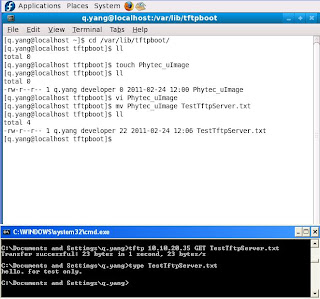


PERMISSION ERROR WHEN WRITE FILE INTO TFTP SERVER
--------------------------------------
#chmod 777 /var/lib/tftpboot


RESTART TFTP SERVER
---------------------
[root@localhost ltib-qs]# service xinetd restart


FAIL TO PUT FILE TO TFTP SERVER [4]
----------------------------------
check the /etc/xinetd.d/tftp file..

change:
server_args = -s /tftpboot

to:
server_args = -c -s /tftpboot

“-c” allows the creation of new file


##################################
# NFS Server set up under UBUNTU
###################################
[3] [2]
quentin@ubuntu:~/CodeSourcery/arm-2010q1$ sudo apt-get install nfs-kernel-server
............
............
quentin@ubuntu:~/CodeSourcery/arm-2010q1$ sudo vi /etc/exports

quentin@ubuntu:~/CodeSourcery/arm-2010q1$ sudo /etc/init.d/nfs-kernel-server start
* Exporting directories for NFS kernel daemon... [ OK ]
* Starting NFS kernel daemon [ OK ]

$ sudo service nfs-kernel-server start
 * Exporting directories for NFS kernel daemon...                                                                                                                 [ OK ]
 * Starting NFS kernel daemon                                                                                                                                     [ OK ]


#########################
# NFS Server set up
#######################
INSTALL NFS-UTILS RPCBIND RPM PACKAGE IF NOT INSTALLED
--------------------------------------------------------
#rpm -q nfs-utils To check whether nfs-utils installed.

INSTALL NFS-UTILS AND RPCBIND VIA YUM
-------------------------------------
Note:Not latest rpm is detected by yum due to yum package is old.
[root@localhost q.yang]# yum install nfs-utils rpcbind
Loaded plugins: refresh-packagekit
Setting up Install Process
Parsing package install arguments
Resolving Dependencies
--> Running transaction check
---> Package rpcbind.i386 0:0.1.4-14.fc9 set to be updated
---> Package nfs-utils.i386 1:1.1.2-2.fc9 set to be updated
--> Finished Dependency Resolution

Dependencies Resolved

=============================================================================
Package Arch Version Repository Size
=============================================================================
Installing:
nfs-utils i386 1:1.1.2-2.fc9 fedora 291 k
rpcbind i386 0.1.4-14.fc9 fedora 48 k

Transaction Summary
=============================================================================
Install 2 Package(s)
Update 0 Package(s)
Remove 0 Package(s)

Total download size: 339 k
Is this ok [y/N]: y
.....................
.....................

CREATE NFS SHARE
-----------------------
-- Option 1: --
You can edit /etc/exports file as follows:
[root@localhost ~]# vi /etc/exports
[q.yang@localhost ~]$ cat /etc/exports
/home/q.yang/Desktop 10.10.20.70(rw,insecure,sync,no_root_squash)
/home/q.yang/lpc3250/ltib-qs/rootfs 10.10.20.88(rw,no_root_squash,no_subtree_check,sync)
/home/q.yang/lpc3250/rootfs4Luke 10.10.20.90(rw,no_root_squash,no_subtree_check,sync)

-- Option 2: --
Using NFS GUI (need install yp-tools.i386 0:2.9-3 ypbind.i386 3:1.20.4-6.fc9 two packages)

START NFS, RPCBIND SERVICE
------------------------------
[root@localhost eclipse]# service rpcbind start
Starting rpcbind: [ OK ]
[root@localhost eclipse]# service nfs start
Starting NFS services: [ OK ]
Starting NFS quotas: [ OK ]
Starting NFS daemon: [ OK ]
Starting NFS mountd: [ OK ]

CHECK WHETHER NFS IS RUNNING
-----------------------------------
You should see portmapper and nfs running as below. If not try
#service nfs restart

[root@localhost ~]# rpcinfo -p
program vers proto port service
100000 4 tcp 111 portmapper
100000 3 tcp 111 portmapper
100000 2 tcp 111 portmapper
100000 4 udp 111 portmapper
100000 3 udp 111 portmapper
100000 2 udp 111 portmapper
100000 4 0 111 portmapper
100000 3 0 111 portmapper
100000 2 0 111 portmapper
100011 1 udp 1016 rquotad
100011 2 udp 1016 rquotad
100011 1 tcp 1019 rquotad
100011 2 tcp 1019 rquotad
100003 2 udp 2049 nfs
100003 3 udp 2049 nfs
100003 4 udp 2049 nfs
100021 1 udp 56276 nlockmgr
100021 3 udp 56276 nlockmgr
100021 4 udp 56276 nlockmgr
100003 2 tcp 2049 nfs
100003 3 tcp 2049 nfs
100003 4 tcp 2049 nfs
100021 1 tcp 39972 nlockmgr
100021 3 tcp 39972 nlockmgr
100021 4 tcp 39972 nlockmgr
100005 1 udp 54842 mountd
100005 1 tcp 59798 mountd
100005 2 udp 54842 mountd
100005 2 tcp 59798 mountd
100005 3 udp 54842 mountd
100005 3 tcp 59798 mountd


CHECK WHETHER NFS IS RUNNING FROM ANOTHER LINUX PC
--------------------------------------------------
On Linux PC B(10.10.20.70):
[root@localhost q.yang]# mount -t nfs 10.10.20.35:/home/q.yang/Desktop /mnt/nfstest/
[root@localhost q.yang]# ll /mnt/nfstest/
total 12
-rw-r--r-- 1 q.yang 500 5559 2010-06-03 17:23 gnome-terminal.desktop

On Linux PC A (10.10.20.35)
[q.yang@localhost ~]$ cat /etc/exports
/home/q.yang/Desktop 10.10.20.70(rw,insecure,sync,no_root_squash)


NFS TROUBLE SHOOTING
-------------------------------------
Fail to connect NFS due to firewall
-----------------------------------
1. Upgrade system-config-firewall/system-config-firewall-tui rpm package so that
correct /etc/sysconfig/iptables, /etc/sysconfig/iptables-config can be generated.
2. Disable firewall.

UPGRADE FIREWALL RPM PACKAGE MANUALLY
----------------------------------------
The files modified and generated as a result of system-config-firewall (system-config-firewall-1.2.16-3.fc9.noarch.rpm)
[root@localhost eclipse]# ll /etc/sysconfig/ |grep ip
-rw------- 1 root root 1753 2011-02-25 14:32 ip6tables-config
-rw------- 1 root root 1740 2011-02-25 14:32 iptables-config
-rw------- 1 root root 1776 2011-02-24 15:25 ip6tables-config.old
-rw------- 1 root root 1876 2011-02-24 15:10 ip6tables.old
-rw------- 1 root root 1763 2011-02-24 15:25 iptables-config.old
-rw------- 1 root root 1871 2011-02-24 15:10 iptables.old


YUM COULDN'T FIND LATEST FIREWALL RPM PACKAGE
[root@localhost eclipse]# yum install system-config-firewall
Loaded plugins: refresh-packagekit
updates | 2.6 kB 00:00
fedora | 2.4 kB 00:00
Setting up Install Process
Parsing package install arguments
Package system-config-firewall-1.2.7-1.fc9.noarch already installed and latest version
Nothing to do


[root@localhost eclipse]# rpm -U /home/q.yang/Download/system-config-firewall-1.2.16-3.fc9.noarch.rpm
warning: /home/q.yang/Download/system-config-firewall-1.2.16-3.fc9.noarch.rpm: Header V3 DSA signature: NOKEY, key ID df9b0ae9
error: Failed dependencies:
system-config-firewall-tui = 1.2.16-3.fc9 is needed by system-config-firewall-1.2.16-3.fc9.noarch
[root@localhost eclipse]# rpm -U /home/q.yang/Download/system-config-firewall-tui-1.2.16-3.fc9.noarch.rpm
warning: /home/q.yang/Download/system-config-firewall-tui-1.2.16-3.fc9.noarch.rpm: Header V3 DSA signature: NOKEY, key ID df9b0ae9
error: Failed dependencies:
system-config-firewall-tui = 1.2.7-1.fc9 is needed by (installed) system-config-firewall-1.2.7-1.fc9.noarch
[root@localhost eclipse]# rpm -q system-config-firewall-tui
system-config-firewall-tui-1.2.7-1.fc9.noarch

REMOVE EXISTING FIREWALL RPM PACKAGE
[root@localhost eclipse]# rpm -e system-config-firewall-tui
error: Failed dependencies:
system-config-firewall-tui = 1.2.7-1.fc9 is needed by (installed) system-config-firewall-1.2.7-1.fc9.noarch
[root@localhost eclipse]# rpm -e system-config-firewall
[root@localhost eclipse]# rpm -e system-config-firewall-tui

MANUALLY INSTALL FIREWALL RPM PACKAGE
[root@localhost eclipse]# rpm -ivh /home/q.yang/Download/system-config-firewall-1.2.16-3.fc9.noarch.rpm
warning: /home/q.yang/Download/system-config-firewall-1.2.16-3.fc9.noarch.rpm: Header V3 DSA signature: NOKEY, key ID df9b0ae9
error: Failed dependencies:
system-config-firewall-tui = 1.2.16-3.fc9 is needed by system-config-firewall-1.2.16-3.fc9.noarch
[root@localhost eclipse]# rpm -ivh /home/q.yang/Download/system-config-firewall-tui-1.2.16-3.fc9.noarch.rpm
warning: /home/q.yang/Download/system-config-firewall-tui-1.2.16-3.fc9.noarch.rpm: Header V3 DSA signature: NOKEY, key ID df9b0ae9
Preparing... ########################################### [100%]
1:system-config-firewall-########################################### [100%]
[root@localhost eclipse]# rpm -ivh /home/q.yang/Download/system-config-firewall-1.2.16-3.fc9.noarch.rpm
warning: /home/q.yang/Download/system-config-firewall-1.2.16-3.fc9.noarch.rpm: Header V3 DSA signature: NOKEY, key ID df9b0ae9
Preparing... ########################################### [100%]
1:system-config-firewall ########################################### [100%]


CHECK FIREWALL FROM COMMAND LINE
-------------------------------------
[root@localhost eclipse]# iptables -L |more
Chain INPUT (policy ACCEPT)
target prot opt source destination
ACCEPT all -- anywhere anywhere state RELATED,ESTABLISHED
ACCEPT icmp -- anywhere anywhere
ACCEPT all -- anywhere anywhere
ACCEPT tcp -- anywhere anywhere state NEW tcp dpt:nfs
ACCEPT udp -- anywhere anywhere state NEW udp dpt:nfs
ACCEPT udp -- anywhere anywhere state NEW udp dpt:netbios-ns
ACCEPT udp -- anywhere anywhere state NEW udp dpt:netbios-dgm
ACCEPT tcp -- anywhere anywhere state NEW tcp dpt:netbios-ssn
ACCEPT tcp -- anywhere anywhere state NEW tcp dpt:microsoft-ds
...................
..................


IF NFS FAILURE IS DUE TO OLD NFS-UTILS RPCBIND RPM PACKAGE
----------------------------------------------------------

REMOVE AND INSTALL NEW PACKAGE VIA YUM
-----------------------------------------

[root@localhost eclipse]# yum erase rpcbind
Loaded plugins: refresh-packagekit
Setting up Remove Process
updates | 2.6 kB 00:00
fedora | 2.4 kB 00:00
Resolving Dependencies
--> Running transaction check
---> Package rpcbind.i386 0:0.1.7-1.fc9 set to be erased
--> Processing Dependency: rpcbind for package: nfs-utils
--> Processing Dependency: rpcbind for package: ypbind
--> Running transaction check
---> Package nfs-utils.i386 1:1.1.2-2.fc9 set to be erased
---> Package ypbind.i386 3:1.20.4-6.fc9 set to be erased
--> Processing Dependency: ypbind for package: yp-tools
--> Running transaction check
---> Package yp-tools.i386 0:2.9-3 set to be erased
--> Finished Dependency Resolution

Dependencies Resolved

=============================================================================
Package Arch Version Repository Size
=============================================================================
Removing:
rpcbind i386 0.1.7-1.fc9 installed 90 k
Removing for dependencies:
nfs-utils i386 1:1.1.2-2.fc9 installed 555 k
yp-tools i386 2.9-3 installed 151 k
ypbind i386 3:1.20.4-6.fc9 installed 64 k

Transaction Summary
=============================================================================
Install 0 Package(s)
Update 0 Package(s)
Remove 4 Package(s)

Is this ok [y/N]:
Downloading Packages:
Running rpm_check_debug
Running Transaction Test
Finished Transaction Test
Transaction Test Succeeded
Running Transaction
Shutting down NFS mountd: [ OK ]
Shutting down NFS daemon: [ OK ]
Shutting down NFS quotas: [ OK ]
Shutting down NFS services: [ OK ]
Starting NFS services: [ OK ]
Starting NFS quotas: [ OK ]
Starting NFS daemon: [ OK ]
Starting NFS mountd: [ OK ]
Stopping RPC idmapd: [ OK ]
Starting RPC idmapd: [ OK ]
Erasing : nfs-utils ######################### [1/4]
warning: /var/lib/nfs/state saved as /var/lib/nfs/state.rpmsave
warning: /var/lib/nfs/etab saved as /var/lib/nfs/etab.rpmsave
Erasing : rpcbind ######################### [2/4]
Erasing : yp-tools ######################### [3/4]
Erasing : ypbind ######################### [4/4]

Removed: rpcbind.i386 0:0.1.7-1.fc9
Dependency Removed: nfs-utils.i386 1:1.1.2-2.fc9 yp-tools.i386 0:2.9-3 ypbind.i386 3:1.20.4-6.fc9
Complete!


[root@localhost eclipse]# rpm -q rpcbind
package rpcbind is not installed
[root@localhost eclipse]# yum install nfs-utils rpcbind
Loaded plugins: refresh-packagekit
Setting up Install Process
Parsing package install arguments
Resolving Dependencies
--> Running transaction check
---> Package rpcbind.i386 0:0.1.4-14.fc9 set to be updated
---> Package nfs-utils.i386 1:1.1.2-2.fc9 set to be updated
--> Finished Dependency Resolution

Dependencies Resolved

=============================================================================
Package Arch Version Repository Size
=============================================================================
Installing:
nfs-utils i386 1:1.1.2-2.fc9 fedora 291 k
rpcbind i386 0.1.4-14.fc9 fedora 48 k

Transaction Summary
=============================================================================
Install 2 Package(s)
Update 0 Package(s)
Remove 0 Package(s)

Total download size: 339 k
Is this ok [y/N]: y

Tuesday, November 9, 2010

Multiple network in Linux

[1] http://www.shallowsky.com/linux/networkSchemes.html
[2] http://www.linuxhomenetworking.com/wiki/index.php/Quick_HOWTO_:_Ch03_:_Linux_Networking


Howto Set Up Multiple Network Schemes on a Linux Laptop

Friday, October 1, 2010

Access Window's shared drive from Linux.

[1]http://www.cyberciti.biz/faq/linux-mount-cifs-windows-share/


[root@QuentinFedoraHome q.yang]# mount -t cifs //10.1.1.9/Photo_Son$/ ./mnt_photo_son/ -o username=GeorgeYANG,password=xxxx,domain=workgroup


[q.yang@QuentinFedoraHome ~]$ cat mountAcerDataSada.sh
mount -t cifs //10.1.1.10/Tool$/ ./mnt_Acer_DataSada/ -o username=GeorgeYANG,password=xxxx,domain=workgroup,uid=q.yang

Wednesday, September 15, 2010

Added new user account and set up VNC.

ADD USER THAT BELONG TO A GROUP
--------------------------------------
[root@localhost q.yang]# useradd -g developer guest


ADD USER
-------------------
#useradd john

MODIFY USER ACCOUNT
------------------
#usermod


SET PASSWORD for NEW USER
-----------------------------
#passwd john


[q.yang@localhost ~]$ ll /home/
total 20
drwx------ 4 guest developer 4096 2010-09-16 11:14 guest
drwx------ 2 root root 4096 2010-07-20 07:29 lost+found
drwx------ 38 q.yang q.yang 4096 2010-09-16 11:14 q.yang

CHANGE GROUP OWNERSHIP FOR ALL FILES IN PATH ./
--------------------------------------------------
[q.yang@localhost ~]$ chgrp -Rv developer ./

Sunday, July 18, 2010

MOVE /HOME DIRECTORY TO 2ND HARD DISK

MOVE /HOME DIRECTORY TO 2ND HARD DISK
-----------------------------------------------
#mkdir -p /mnt/200GData
#mount /dev/sdb5 /mnt/200GData

#cp -rpf /home/* /mnt/200GData transfer current home to 2nd hard drive
#umount /mnt/200GData

#vi /etc/fstab add two lines /dev/sdb5, /dev/sdb1

[root@localhost ltib-qs]# cat /etc/fstab
/dev/VolGroup00/LogVol00 / ext3 defaults 1 1
UUID=db85ce6b-b0e2-4f47-ad07-011f425bd92c /boot ext3 defaults 1 2
tmpfs /dev/shm tmpfs defaults 0 0
devpts /dev/pts devpts gid=5,mode=620 0 0
sysfs /sys sysfs defaults 0 0
proc /proc proc defaults 0 0
/dev/VolGroup00/LogVol01 swap swap defaults 0 0
/dev/sdb5 /home ext2 defaults 0 0
/dev/sdb1 /opt ext2 defaults 0 0


#mount -a

Now the /home is on 2nd drive /dev/sdb5, if #umount /home, /home is on original 1st drive.

Ref [1] http://forums.fedoraforum.org/showthread.php?t=179402
[2] http://www.ibm.com/developerworks/library/l-partplan.html


SELinx warning after move /home to seperate hard drive
----------------------------------------------------------------
SELinux permission checks on files labeled file_t are being denied. file_t is
the context the SELinux kernel gives to files that do not have a label. This
indicates a serious labeling problem. No files on an SELinux box should ever be
labeled file_t. If you have just added a new disk drive to the system you can
relabel it using the restorecon command. Otherwise you should relabel the entire
files system.

[root@localhost /]# restorecon -r /home/
restorecon: unable to stat file /home/q.yang/.gvfs: Permission denied
[root@localhost /]# restorecon -r /opt/

Wednesday, July 14, 2010

Build Linux Kernel from Source in Fedora 9

Ref [1] http://fedoraproject.org/wiki/Docs/CustomKernel#Configure_Kernel_Options
Ref [2] http://www.howtoforge.com/kernel_compilation_fedora

GET KERNEL SOURCE CODE BY EITHER YUM OR DIRECTLY FROM HTTP SITE
--------------------------------------------------------------

WHERE IS KERNEL SOURCE CODE IN FEDORA 9
----------------------------------------------------

JUST GET HEADER FILES OF KERNEL (enough to compile some extra modules)
-----------------------------------------------------------------------
kernel-devel-2.6.25-14.fc9.i686.rpm only gives you the header files of linux kernel
[root@localhost sierra_drv_1.7.32]# yum install kernel-devel-2.6.25-14.fc9.i686

DIRECT DOWNLOAD KERNEL RPM
--------------------------------
cd /usr/src
wget http://download.fedora.redhat.com/pub/fedora/linux/core/9/source/SRPMS/kernel-2.6.25-14.fc9.src.rpm
rpm -ivh kernel-2.6.18-1.2798.fc6.src.rpm

NOTE: .src.rpm is no longer availabe in above path.


GET KERNEL RPM VIA YUM
-----------------------------------
yum install rpmdevtools yum-utils
yumdownloader --destdir /home/q.yang/Download/LinuxSrcRpm2.6.27/ --source kernel
[q.yang@localhost ~]$ rpmdev-setuptree
[q.yang@localhost ~]$ su -c 'yum-builddep Download/LinuxSrcRpm2.6.27/kernel-2.6.27.25-78.2.56.fc9.src.rpm'

[q.yang@localhost ~]$ rpm -ivh /home/q.yang/Download/LinuxSrcRpm2.6.27/kernel-2.6.27.25-78.2.56.fc9.src.rpm

[q.yang@localhost SPECS]$ rpmbuild -bp --target=i686 kernel.spec

BUILD KERNEL ON USER SPACE
-----------------------------
1. Prepare a RPM package building environment in your home directory. Run the following command:
[q.yang@localhost ~]$ rpmdev-setuptree
[q.yang@localhost ~]$ ll
total 40
drwxr-xr-x 2 q.yang q.yang 4096 2010-06-03 17:23 Desktop
drwxr-xr-x 4 q.yang q.yang 4096 2010-07-06 10:54 Documents
drwxr-xr-x 4 q.yang q.yang 4096 2010-07-06 09:54 Download
drwxrwxr-x 3 q.yang q.yang 4096 2010-06-10 11:37 lpc3250
drwxr-xr-x 2 q.yang q.yang 4096 2010-06-03 17:13 Music
drwxr-xr-x 2 q.yang q.yang 4096 2010-06-03 17:13 Pictures
drwxr-xr-x 2 q.yang q.yang 4096 2010-06-03 17:13 Public
drwxrwxr-x 7 q.yang q.yang 4096 2010-07-06 10:55 rpmbuild NEW DIRECTORY
drwxr-xr-x 2 q.yang q.yang 4096 2010-06-03 17:13 Templates
drwxr-xr-x 2 q.yang q.yang 4096 2010-06-03 17:13 Videos

rpmbuild directory automatically only locate in user's home directory (i.e., ~)
and a new .rpmmacros will appear

NOTE: pls run 'rpmdev-setuptree' command with q.yang user instead of root. It will impact where the target directory of 'rpm -ivh ....' command.


2. Install build dependencies for the kernel source with the yum-builddep command (root is required to install these packages):
[q.yang@localhost ~]$ su -c 'yum-builddep Download/LinuxSrcRpm2.6.27/kernel-2.6.27.25-78.2.56.fc9.src.rpm'
Password:
Loaded plugins: refresh-packagekit
module-init-tools-3.4-13.fc9.i386
patch-2.5.4-35.fc9.i386
bash-3.2-23.fc9.i386
coreutils-6.10-35.fc9.i386
2:tar-1.19-6.fc9.i386
bzip2-1.0.5-2.fc9.i386
1:findutils-4.2.33-3.fc9.i386
gzip-1.3.12-6.fc9.i386
m4-1.4.10-3.fc9.i386
4:perl-5.10.0-68.fc9.i386
1:make-3.81-12.fc9.i386
diffutils-2.8.1-21.fc9.i386
gawk-3.1.5-17.fc9.i386
gcc-4.3.0-8.i386
binutils-2.18.50.0.6-7.fc9.i386
redhat-rpm-config-9.0.2-1.fc9.noarch
rpm-build-4.4.2.3-3.fc9.i386
No uninstalled build requires

3. Install kernel-.src.rpm with the following command
rpm -ivh /home/q.yang/Download/LinuxSrcRpm2.6.27/kernel-2.6.27.25-78.2.56.fc9.src.rpm

New installation use:
[q.yang@localhost ~]$ rpm -ivh /home/q.yang/Download/LinuxSrcRpm2.6.27/kernel-2.6.27.25-78.2.56.fc9.src.rpm

To just update the installation use:
[q.yang@localhost ~]$ rpm -Uvh Download/LinuxSrcRpm2.6.27/kernel-2.6.27.25-78.2.56.fc9.src.rpm

1:kernel warning: user mockbuild does not exist - using root
warning: group mockbuild does not exist - using root
warning: user mockbuild does not exist - using root
warning: group mockbuild does not exist - using root

( Afterwards, new files appear under path : /home/q.yang/rpmbuild/SOURCES/ )

4. This step expands all of the source code files for the kernel. This is required to view the code, edit the code, or to generate a patch.
Prepare the kernel source tree using the following commands:

[q.yang@localhost SPECS]$ rpmbuild -bp --target=i686 kernel.spec

(
Afterwards, you will see all source codes and new directories under path /BUILD/:

|-- BUILD
| `-- kernel-2.6.27
| |-- linux-2.6.27.i686
| `-- vanilla-2.6.27


vanilla-2.6.27/drivers/rtc/rtc-sysfs.c
..........................
vanilla-2.6.27/drivers/rtc/rtc-bfin.c
................................
vanilla-2.6.27/drivers/rtc/rtc-sh.c
vanilla-2.6.27/drivers/watchdog/alim1535_wdt.c
....................................
vanilla-2.6.27/drivers/watchdog/pcwd_pci.c
vanilla-2.6.27/drivers/watchdog/s3c2410_wdt.c


linux-2.6.27.i686/drivers/rtc/rtc-sysfs.c
..........................
linux-2.6.27.i686/drivers/rtc/rtc-bfin.c
................................
linux-2.6.27.i686/drivers/rtc/rtc-sh.c
linux-2.6.27.i686/drivers/watchdog/alim1535_wdt.c
....................................
linux-2.6.27.i686/drivers/watchdog/pcwd_pci.c
linux-2.6.27.i686/drivers/watchdog/s3c2410_wdt.c


5. Do a source code copy if need to generate kernel patch.

[q.yang@localhost ~]$ cp -r ~/rpmbuild/BUILD/kernel-2.6.27/linux-2.6.27.i686 ~/rpmbuild/BUILD/kernel-2.6.27.orig
[q.yang@localhost ~]$ cp -al ~/rpmbuild/BUILD/kernel-2.6.27.orig/ ~/rpmbuild/BUILD/kernel-2.6.27.new

6. Config customized kernel.

[q.yang@localhost linux-2.6.27.i686]$ pwd
/home/q.yang/rpmbuild/BUILD/kernel-2.6.27/linux-2.6.27.i686
[q.yang@localhost linux-2.6.27.i686]$ make menuconfig
HOSTCC scripts/kconfig/lxdialog/checklist.o
HOSTCC scripts/kconfig/lxdialog/inputbox.o
HOSTCC scripts/kconfig/lxdialog/menubox.o
HOSTCC scripts/kconfig/lxdialog/textbox.o
HOSTCC scripts/kconfig/lxdialog/util.o
HOSTCC scripts/kconfig/lxdialog/yesno.o
HOSTCC scripts/kconfig/mconf.o
HOSTLD scripts/kconfig/mconf
scripts/kconfig/mconf arch/x86/Kconfig
#
# configuration written to .config
#


*** End of Linux kernel configuration.
*** Execute 'make' to build the kernel or try 'make help'.


7. Edit .config and copy to /rpmbuild/SOURCE
Add a new line to the top of the config file that contains the hardware platform the kernel is built for (the output of uname -i).
[q.yang@localhost linux-2.6.27.i686]$ vi .config
Added '# i386' in the first line of .config

[q.yang@localhost linux-2.6.27.i686]$ cp .config ~/rpmbuild/SOURCES/config-i686

===Following steps will Prepare Build Files======

8. Edit /rpmbuild/SPECS/kernel.spec
[q.yang@localhost linux-2.6.27.i686]$ cd ~/rpmbuild/SPECS/
[q.yang@localhost SPECS]$ vi kernel.spec

%define buildid .gsncommsdev

9. If you generated a patch, add the patch to the kernel.spec file, preferably at the end of all the existing patches and clearly commented.

The patch then needs to be applied in the patch application section of the spec file. Again, at the end of the existing patch applications and clearly commented.

===Following steps will build the new kernel=============

10.
To build all kernel flavors:
[q.yang@localhost SPECS]$ rpmbuild -bb --target=i686 kernel.spec

= To disable specific kernel flavors from the build (for a faster build):
rpmbuild -bb --without

Wednesday, June 9, 2010

Q and A Fedora 9

# Make pdf document error.
------------------------------------------------
[q.yang@localhost DocBook]$ make pdfdocs
make: *** No rule to make target `/scripts/kernel-doc', needed by `/wanbook.xml'. Stop.

[q.yang@localhost linux-2.6.27.8]$ make pdfdocs
HOSTCC scripts/basic/fixdep
HOSTCC scripts/basic/docproc
DOCPROC Documentation/DocBook/wanbook.xml
PDF Documentation/DocBook/wanbook.pdf
*** You have to install docbook-utils or xmlto ***
make[1]: *** [Documentation/DocBook/wanbook.pdf] Error 1
make: *** [pdfdocs] Error 2
[q.yang@localhost linux-2.6.27.8]$ yum install docbook-utils
[root@localhost linux-2.6.27.8]# yum install xmlto

SAMBA Setting - Fedora 9 / 20

1. [root@localhost usb]# yum install system-config-samba
2. [root@localhost usb]# system-config-samba

addShare->basic (directory,sharename,description,writable&visible)
->Access (only allow access to specific user)

[root@localhost usb]# vi /etc/samba/smb.conf can see the changes made by 'system-config-samba'.

3. [root@localhost usb]# system-config-firewall
4. [root@localhost usb]# smbpasswd -a q.yang
New SMB password:
Retype new SMB password:
Added user q.yang.

this is doing something that also can be done in
'[root@localhost usb]# system-config-user'
5. [root@localhost usb]# system-config-services

enable smb service so that smb auto start after reboot
This can also be done via command line:
[root@localhost usb]# chkconfig smb on

6. [root@localhost usb]# service smb restart
Shutting down SMB services: [ OK ]
Starting SMB services: [ OK ]

7. check samba service

[root@localhost usb]# smbclient -L localhost
Enter q.yang's password:
Domain=[LOCALHOST] OS=[Unix] Server=[Samba 3.2.11-0.28.fc9]

Sharename Type Comment
--------- ---- -------
Fedora9Samba Disk Quentin's Linux Box
IPC$ IPC IPC Service (Samba Server Version 3.2.11-0.28.fc9)
q.yang Disk Home Directories
Domain=[LOCALHOST] OS=[Unix] Server=[Samba 3.2.11-0.28.fc9]

Server Comment
--------- -------

Workgroup Master
--------- -------
GRIDSENSE ENG-R50E
MYGROUP LOCALHOST


8. If samba not accessible from another PC, check firewall
In fedora20
#firewall-config  make sure to tick 'samaba' service


=========== finished samba setting up to this point============

=== validate it from windows ================
map network device

\\10.10.20.70\Fedora9Samba\

You will be asked user name and samba password.


[root@localhost usb]# yum install system-config-samba
Loaded plugins: refresh-packagekit
updates-newkey | 3.4 kB 00:00
fedora | 2.4 kB 00:00
http://archive.kernel.org/fedora-archive/fedora/linux/updates/9/i386/repodata/repomd.xml: [Errno 14] HTTP Error 404: Not Found
Trying other mirror.
updates | 2.6 kB 00:00
Setting up Install Process
Parsing package install arguments
Resolving Dependencies
--> Running transaction check
---> Package system-config-samba.noarch 0:1.2.63-1.fc9 set to be updated
--> Processing Dependency: samba for package: system-config-samba
--> Running transaction check
---> Package samba.i386 0:3.2.11-0.28.fc9 set to be updated
--> Finished Dependency Resolution

Dependencies Resolved

======================================================================================
Package Arch Version Repository Size
======================================================================================
Installing:
system-config-samba noarch 1.2.63-1.fc9 fedora 413 k
Installing for dependencies:
samba i386 3.2.11-0.28.fc9 updates-newkey 3.9 M

Transaction Summary
======================================================================================
Install 2 Package(s)
Update 0 Package(s)
Remove 0 Package(s)

Total download size: 4.3 M
Is this ok [y/N]: y
Downloading Packages:
(1/2): system-config-samba-1.2.63-1.fc9.noarch.rpm | 413 kB 00:03
(2/2): samba-3.2.11-0.28.fc9.i386.rpm | 3.9 MB 01:50
-----------------------------------------------------------------------------------------------
Total 38 kB/s | 4.3 MB 01:56
Running rpm_check_debug
Running Transaction Test
Finished Transaction Test
Transaction Test Succeeded
Running Transaction
Installing : samba 1/2
Installing : system-config-samba 2/2

Installed:
system-config-samba.noarch 0:1.2.63-1.fc9

Dependency Installed:
samba.i386 0:3.2.11-0.28.fc9

Complete!


[root@fedora20 samba]# yum install system-config-samba
[root@fedora20 samba]# rpm -qa |grep samba
samba-4.1.6-1.fc20.x86_64
samba-common-4.1.6-1.fc20.x86_64
system-config-samba-1.2.100-2.fc20.noarch
samba-client-4.1.6-1.fc20.x86_64
samba-libs-4.1.6-1.fc20.x86_64
#system-config-samba
Use GUI to add samba user; then choose /home/q.yang as samba shared folder and only specific user access.
smb.conf will be changed after GUI change
[Fedora20Home]
comment = Quentin's Fedora20 home
path = /home/q.yang
read only = no
; browseable = yes
valid users = q.yang
#systemctl enable smb.service
#systemctl restart  smb.service
[root@fedora20 samba]# systemctl |grep smb
smb.service         loaded active running   Samba SMB Daemon

[q.yang@fedora20 samba]$ smbclient -L localhost
Enter q.yang's password:
Domain=[MYGROUP] OS=[Unix] Server=[Samba 4.1.6]

Sharename       Type      Comment
---------       ----      -------
Fedora20Home    Disk      Quentin's Fedora20 home
IPC$            IPC       IPC Service (Samba Server Version 4.1.6)
q.yang          Disk      Home Directories
Domain=[MYGROUP] OS=[Unix] Server=[Samba 4.1.6]

Server               Comment
---------            -------

Workgroup            Master
---------            -------

Saturday, May 2, 2009

Alias in Linux

QUENTIN'S ALIAS SUMMARY
---------------------------------


QuentinFedoraHome updated @ 20-NOV-2010 SAT 07:09Am
-------------------------------------------------------
[q.yang@QuentinFedoraHome ~]$ alias
alias cp='cp -pi'
alias egrepin='egrep -i -n'
alias fd='find . -name'
alias l.='ls -d .* --color=tty'
alias la='ls -all --color=tty'
alias lax='ls -all -X'
alias lct='ls -all -ct'
alias ll='ls -l --color=auto'
alias ls='ls --color=auto'
alias lt='ll -t'
alias lx='ls -X'
alias mda7='mount /dev/hda7 /mnt/hda7 && ls /mnt/hda7 '
alias mda8='mount /dev/hda8 /mnt/hda8 && ls /mnt/hda8 '
alias mda9='mount /dev/hda9 /mnt/hda9 && ls /mnt/hda9 '
alias mv='mv -i'
alias rm='rm -i'
alias sshuni='ssh quentin@thiazi.snrc.uow.edu.au'
alias svnstart='svnserve -d'
alias tardel='tar --delete --file='
alias tartvf='tar -tvf '
alias uda7='umount /mnt/hda7 && echo "successfully unmounted hda7" '
alias uda8='umount /mnt/hda8 && echo "successfully unmounted hda8" '
alias uda9='umount /mnt/hda9 && echo "successfully unmounted hda9" '
alias vi='vim'
alias webstart='/opt/apache/bin/apachectl start'
alias which='alias | /usr/bin/which --tty-only --read-alias --show-dot --show-tilde'


CREATE YOUR OWN COMMAND WITH ALIAS
---------------------------------------------------
edit file /home/user/.bashrc

Added the short command name for your easy word typing.


[q.yang@QuentinFedoraHome ~]$ vi ./.bashrc# .bashrc
# Source global definitionsif [ -f /etc/bashrc ]; then . /etc/bashrcfi
# User specific aliases and functions
alias mda8='mount /dev/hda8 /mnt/hda8 && ls /mnt/hda8 'alias uda8='umount /mnt/hda8 && echo "successfully unmounted hda8" '
alias mda7='mount /dev/hda7 /mnt/hda7 && ls /mnt/hda7 'alias uda7='umount /mnt/hda7 && echo "successfully unmounted hda7" '
alias mda9='mount /dev/hda9 /mnt/hda9 && ls /mnt/hda9 'alias uda9='umount /mnt/hda9 && echo "successfully unmounted hda9" '
alias sshuni='ssh quentin@thiazi.snrc.uow.edu.au'
alias l.='ls -d .* --color=tty'alias la='ls -all --color=tty'alias lct='ls -all -ct'alias lt='ll -t'alias lax='ls -all -X'alias lx='ls -X'
alias fd='find . -name'

alias mv='mv -i'alias cp='cp -pi'alias rm='rm -i'
alias vi='vim'
alias tardel='tar --delete --file='alias tartvf='tar -tvf '#egrep, ignore case, print line numberalias egrepin='egrep -i -n'
alias stsvn='svnserve -d'

Monday, April 6, 2009

Install and Uninstall Programs in Fedora

[1] http://www.rootninja.com/easy-install-flash-player-in-firefox-on-fedora-12/

su - root

yum install gcc gcc-c++


rpm -ivh xxxxxx.rpm

1. 以.gz结尾的为压缩文件,用命令:gzip -d filename来解压,得到的文件在当前目录中,但已没有了.gz。

2、以.tar结尾的为归档文件,用命令:tar -xvf filename来展开,生成的文件与源文件在同一目录中,只是少了.tar。


3、以.tar.gz结尾的文件最常见,可直接用命令:gzip -cd filename | tar xfv -来安装

[q.yang@QuentinFedora12 Download]$ gunzip install_flash_player_10_linux.tar.gz
[q.yang@QuentinFedora12 Download]$ ll
total 11700
-rw-rw-r--. 1 q.yang q.yang 11960320 2010-09-25 06:06 install_flash_player_10_linux.tar


[q.yang@QuentinFedora12 Download]$ tar -xvf install_flash_player_10_linux.tar
libflashplayer.so
[q.yang@QuentinFedora12 Download]$ ll
total 23372
-rw-rw-r--. 1 q.yang q.yang 11960320 2010-09-25 06:06 install_flash_player_10_linux.tar
-rwxrwxr-x. 1 q.yang q.yang 11951040 2010-09-15 10:41 libflashplayer.so


# yum install gnash-plugin

# mozilla-plugin-config

Thursday, November 20, 2008

View Linux Drive from Windows - SAMBA - Fedora 5


[q.yang@glomesprod01 ~]$ ls -alt /etc/samba/smb.conf
-rw-r--r-- 1 root root 10704 Feb 14 2006 /etc/samba/smb.conf
[q.yang@glomesprod01 ~]$ yum install system-config-samba
Loading "installonlyn" plugin
You need to be root to perform this command.
[q.yang@glomesprod01 ~]$ su
Password:
[root@glomesprod01 q.yang]# yum install system-config-samba
Loading "installonlyn" plugin
Setting up Install Process
Setting up repositories
core [1/3]
core 100% |=========================| 1.1 kB 00:00
updates [2/3]
updates 100% |=========================| 1.2 kB 00:00
extras [3/3]
extras 100% |=========================| 1.1 kB 00:00
Reading repository metadata in from local files
primary.xml.gz 100% |=========================| 767 kB 00:01
core : ################################################## 2207/2207
Added 2207 new packages, deleted 0 old in 43.32 seconds
primary.xml.gz 100% |=========================| 362 kB 00:09
updates : ################################################## 1013/1013
Added 1013 new packages, deleted 0 old in 20.89 seconds
primary.xml.gz 100% |=========================| 1.3 MB 00:09
extras : ################################################## 4277/4277
Added 4277 new packages, deleted 0 old in 73.21 seconds
Parsing package install arguments
Resolving Dependencies
--> Populating transaction set with selected packages. Please wait.
---> Downloading header for system-config-samba to pack into transaction set.
system-config-samba-1.2.3 100% |=========================| 32 kB 00:00
---> Package system-config-samba.noarch 0:1.2.34-1 set to be updated
--> Running transaction check
--> Processing Dependency: samba for package: system-config-samba
--> Restarting Dependency Resolution with new changes.
--> Populating transaction set with selected packages. Please wait.
---> Downloading header for samba to pack into transaction set.
samba-3.0.24-7.fc5.i386.r 100% |=========================| 109 kB 00:02
---> Package samba.i386 0:3.0.24-7.fc5 set to be updated
--> Running transaction check
--> Processing Dependency: cups-libs >= 1:1.2.8-1 for package: samba
--> Processing Dependency: samba-common = 0:3.0.24-7.fc5 for package: samba
--> Restarting Dependency Resolution with new changes.
--> Populating transaction set with selected packages. Please wait.
---> Downloading header for cups-libs to pack into transaction set.
cups-libs-1.2.8-1.fc5.i38 100% |=========================| 35 kB 00:00
---> Package cups-libs.i386 1:1.2.8-1.fc5 set to be updated
---> Downloading header for samba-common to pack into transaction set.
samba-common-3.0.24-7.fc5 100% |=========================| 42 kB 00:01
---> Package samba-common.i386 0:3.0.24-7.fc5 set to be updated
--> Running transaction check
--> Processing Dependency: cups-libs = 1:1.1.23 for package: cups
--> Processing Dependency: samba-common = 0:3.0.21b-2 for package: samba-client
--> Restarting Dependency Resolution with new changes.
--> Populating transaction set with selected packages. Please wait.
---> Downloading header for cups to pack into transaction set.
cups-1.2.8-1.fc5.i386.rpm 100% |=========================| 199 kB 00:05
---> Package cups.i386 1:1.2.8-1.fc5 set to be updated
---> Downloading header for samba-client to pack into transaction set.
samba-client-3.0.24-7.fc5 100% |=========================| 38 kB 00:01
---> Package samba-client.i386 0:3.0.24-7.fc5 set to be updated
--> Running transaction check
--> Processing Conflict: cups conflicts foomatic < 3.0.2-33.3
--> Processing Conflict: cups conflicts system-config-printer < 0.6.151.3
--> Processing Conflict: cups conflicts hplip < 0.9.9-5.1
--> Restarting Dependency Resolution with new changes.
--> Populating transaction set with selected packages. Please wait.
---> Downloading header for foomatic to pack into transaction set.
foomatic-3.0.2-33.3.i386. 100% |=========================| 536 kB 00:10
---> Package foomatic.i386 0:3.0.2-33.3 set to be updated
---> Downloading header for hplip to pack into transaction set.
hplip-1.6.6a-1.1.i386.rpm 100% |=========================| 96 kB 00:01
---> Package hplip.i386 0:1.6.6a-1.1 set to be updated
---> Downloading header for system-config-printer to pack into transaction set.
system-config-printer-0.6 100% |=========================| 70 kB 00:01
---> Package system-config-printer.i386 0:0.6.151.8-1 set to be updated
--> Running transaction check
--> Processing Dependency: hpijs = 1:1.6.6a-1.1 for package: hplip
--> Processing Dependency: system-config-printer = 0.6.151-1 for package: system-config-printer-gui
--> Restarting Dependency Resolution with new changes.
--> Populating transaction set with selected packages. Please wait.
---> Downloading header for hpijs to pack into transaction set.
hpijs-1.6.6a-1.1.i386.rpm 100% |=========================| 7.8 kB 00:00
---> Package hpijs.i386 1:1.6.6a-1.1 set to be updated
---> Downloading header for system-config-printer-gui to pack into transaction set.
system-config-printer-gui 100% |=========================| 51 kB 00:01
---> Package system-config-printer-gui.i386 0:0.6.151.8-1 set to be updated
--> Running transaction check

Dependencies Resolved

=============================================================================
Package Arch Version Repository Size
=============================================================================
Installing:
system-config-samba noarch 1.2.34-1 core 246 k
Installing for dependencies:
samba i386 3.0.24-7.fc5 updates 16 M
Updating for dependencies:
cups i386 1:1.2.8-1.fc5 updates 2.9 M
cups-libs i386 1:1.2.8-1.fc5 updates 180 k
foomatic i386 3.0.2-33.3 updates 13 M
hpijs i386 1:1.6.6a-1.1 updates 221 k
hplip i386 1.6.6a-1.1 updates 7.8 M
samba-client i386 3.0.24-7.fc5 updates 4.2 M
samba-common i386 3.0.24-7.fc5 updates 8.5 M
system-config-printer i386 0.6.151.8-1 updates 1.1 M
system-config-printer-gui i386 0.6.151.8-1 updates 214 k

Transaction Summary
=============================================================================
Install 2 Package(s)
Update 9 Package(s)
Remove 0 Package(s)
Total download size: 54 M
Is this ok [y/N]:
ownloading Packages:
(1/11): cups-1.2.8-1.fc5. 100% |=========================| 2.9 MB 00:53
(2/11): foomatic-3.0.2-33 100% |=========================| 13 MB 03:46
(3/11): hpijs-1.6.6a-1.1. 100% |=========================| 221 kB 00:04
(4/11): samba-3.0.24-7.fc 100% |=========================| 16 MB 05:18
(5/11): samba-common-3.0. 100% |=========================| 8.5 MB 02:37
(6/11): cups-libs-1.2.8-1 100% |=========================| 180 kB 00:02
(7/11): samba-client-3.0. 100% |=========================| 4.2 MB 01:29
(8/11): system-config-pri 100% |=========================| 214 kB 00:05
(9/11): hplip-1.6.6a-1.1. 100% |=========================| 7.8 MB 02:26
(10/11): system-config-sa 100% |=========================| 246 kB 00:00
(11/11): system-config-pr 100% |=========================| 1.1 MB 00:35
[root@glomesprod01 q.yang]#

[q.yang@glomesprod01 ~]$ system-config-securitylevel
[q.yang@glomesprod01 ~]$ system-config-users
[q.yang@glomesprod01 ~]$ system-config-samba

Samba uses /etc/samba/smb.conf as its configuration file. If you change this configuration file, the changes will not take effect until you restart the Samba daemon with the command

#service smb restart.

A Samba user account will not be active until a Samba password is set for it.

#smbpasswd -a q.yang
New SMB password:
Retype new SMB password:


Relevant Link: http://www.reallylinux.com/docs/sambaserver.shtml


VNC set up in Fedora

[1] http://fedoranews.org/tchung/vnc/
[2] http://bobpeers.com/linux/vnc
[3] http://forums.fedoraforum.org/showthread.php?t=188625&page=2
[4] http://www.rpmfind.net/linux/rpm2html/search.php?query=selinux-policy&submit=Search+...
[5] http://linux.derkeiler.com/Mailing-Lists/Fedora/2008-07/msg01106.html
[6] http://rpm.pbone.net/index.php3/stat/26/dist/64/size/615728/name/vnc-4.1.3-1.fc9.src.rpm


BUG FIX VNC NOT RESPONDING CONTINUOUS KEY PRESS
-----------------------------------------------
See [5], need to upgrade Vnc package.
This has been resolved since installing vnc-server-4.1.2-31 from
Fedora-Updates. This coincided with an update to the xorg-x11-* packages,
so those updates could have been responsible for the fix, too. In any case,
I'm very grateful this has been corrected! :)

Download vnc-server-4.1.3-1.fc9.i386.rpm from [6]


HOW VNC SERVER PORT NUMBER IS DERIVED
-----------------------------------------
vnc port number is 5900+userDesktopIndexNumber

$vncviewer 10.1.1.10:2
Then in firewall, 5900+2 = 5902 must be enabled. [2]


BUG FIX WHY ONLY GET GREY SCREEN WHEN CONNECT VNC DESKTOP
------------------------------------------------------
Fixed bug in .vnc/localhost:localdomain:2.log
".......failed to execute message bus daemon /bin/dbus-daemon...."

Solution refer to web link [3]
upgrade selinux-policy, it solved the bug.

Details as below:

root@localhost q.yang]# rpm -q selinux-policy
selinux-policy-3.3.1-42.fc9.noarch
[root@localhost q.yang]# rpm -e selinux-policy
[root@localhost q.yang]# rpm -ivh /home/q.yang/Download/selinux-policy-3.3.1-132.fc9.noarch.rpm

Then

[root@localhost q.yang]# /sbin/service vncserver restart

[root@localhost q.yang]# vncviewer 10.1.1.5:2

Finally see the VNC desktop.

[root@localhost q.yang]# cat /home/q.yang/.vnc/xstartup
#!/bin/sh

# Uncomment the following two lines for normal desktop:
unset SESSION_MANAGER
exec /etc/X11/xinit/xinitrc

[ -x /etc/vnc/xstartup ] && exec /etc/vnc/xstartup
[ -r $HOME/.Xresources ] && xrdb $HOME/.Xresources
xsetroot -solid grey
vncconfig -iconic &
xterm -geometry 80x24+10+10 -ls -title "$VNCDESKTOP Desktop" &
twm &
#startkde &
[root@localhost q.yang]#
[q.yang@localhost ~]$


------------------------------------------------


1. check whether VNC installed.
[tchung@tchung101 tchung]$ rpm -q vnc vnc-server
vnc-4.0-0.beta4.3.2
vnc-server-4.0-0.beta4.3.2


If not installed, use yum install vnc

[root@QuentinFedora12 Documents]# yum install vnc-server
Loaded plugins: presto, refresh-packagekit
Setting up Install Process
Resolving Dependencies
--> Running transaction check
---> Package tigervnc-server.i686 0:1.0.1-1.fc12 set to be updated
--> Processing Dependency: xorg-x11-fonts-misc for package: tigervnc-server-1.0.1-1.fc12.i686
--> Running transaction check
---> Package xorg-x11-fonts-misc.noarch 0:7.2-9.fc12 set to be updated
--> Finished Dependency Resolution

Dependencies Resolved

================================================================================
 Package                   Arch         Version             Repository     Size
================================================================================
Installing:
 tigervnc-server           i686         1.0.1-1.fc12        updates       1.1 M
Installing for dependencies:
 xorg-x11-fonts-misc       noarch       7.2-9.fc12          fedora        5.7 M

Transaction Summary
================================================================================
Install       2 Package(s)
Upgrade       0 Package(s)

Total download size: 6.8 M
Is this ok [y/N]: y
Downloading Packages:
Setting up and reading Presto delta metadata
http://ga13.files.bigpond.com:4040/fedora/linux/releases/12/Everything/i386/os/repodata/521b16256b03f708faa16735faeb724df48eb2562ba044c595add16e23288979-prestodelta.xml.gz: [Errno 14] PYCURL ERROR 7 - ""
Trying other mirror.
fedora/prestodelta                                       | 1.3 kB     00:00
updates/prestodelta                                      | 9.0 kB     00:00
Processing delta metadata
Package(s) data still to download: 6.8 M
(1/2): tigervnc-server-1.0.1-1.fc12.i686.rpm             | 1.1 MB     00:02
(2/2): xorg-x11-fonts-misc-7.2-9.fc12.noarch.rpm                          | 5.7 MB     00:12
-------------------------------------------------------------------------------------------------
Total                                                            459 kB/s | 6.8 MB     00:15
warning: rpmts_HdrFromFdno: Header V3 RSA/SHA1 signature: NOKEY, key ID 57bbccba
fedora/gpgkey                                                             | 3.2 kB     00:00 ...
Importing GPG key 0x57BBCCBA "Fedora (12) " from /etc/pki/rpm-gpg/RPM-GPG-KEY-fedora-i386
Is this ok [y/N]: y
Running rpm_check_debug
Running Transaction Test
Finished Transaction Test
Transaction Test Succeeded
Running Transaction
  Installing     : xorg-x11-fonts-misc-7.2-9.fc12.noarch                                                                1/2
  Installing     : tigervnc-server-1.0.1-1.fc12.i686                                                                    2/2

Installed:
  tigervnc-server.i686 0:1.0.1-1.fc12

Dependency Installed:
  xorg-x11-fonts-misc.noarch 0:7.2-9.fc12

Complete!


2. change setting

[tchung@tchung101 tchung]$ sudo vi /etc/sysconfig/vncservers

VNCSERVERS="1:q.yang 2:m.xie"
VNCSERVERARGS[1]="-geometry 1024x768"
VNCSERVERARGS[2]="-geometry 1024x768"


3. pwd
[tchung@tchung101 tchung]$ vncpasswd
Password:

4. restart vnc service

[tchung@tchung101 tchung]$ sudo /sbin/service vncserver start
Starting VNC server: 1:tchung                              [  OK  ]


[tchung@tchung101 tchung]$

Verify:


5. edit ~/.vnc/xstartup
[q.yang@QuentinFedora12 Documents]$ cat ~/.vnc/xstartup 
#!/bin/sh

vncconfig -iconic &
unset SESSION_MANAGER
unset DBUS_SESSION_BUS_ADDRESS
OS=`uname -s`
if [ $OS = 'Linux' ]; then
  case "$WINDOWMANAGER" in
    *gnome*)
      if [ -e /etc/SuSE-release ]; then
        PATH=$PATH:/opt/gnome/bin
        export PATH
      fi
      ;;
  esac
fi
if [ -x /etc/X11/xinit/xinitrc ]; then
  exec /etc/X11/xinit/xinitrc
fi
if [ -f /etc/X11/xinit/xinitrc ]; then
  exec sh /etc/X11/xinit/xinitrc
fi
[ -r $HOME/.Xresources ] && xrdb $HOME/.Xresources
xsetroot -solid grey
xterm -geometry 80x24+10+10 -ls -title "$VNCDESKTOP Desktop" &
twm &
#startkde &


6. restart vnc service

7. change firewall to allow vnc  

NOTE: Please use GUI to do firewall settings for fedora 12 as 'iptables' has different format for fedora 9 and fedora 12. Below is iptables setting for fedora 9 ONLY.

tchung@tchung101 tchung]$ sudo vi /etc/sysconfig/iptables

# Firewall configuration written by redhat-config-securitylevel
# Manual customization of this file is not recommended.
*filter
:INPUT ACCEPT [0:0]
:FORWARD ACCEPT [0:0]
:OUTPUT ACCEPT [0:0]
:RH-Firewall-1-INPUT - [0:0]
-A INPUT -j RH-Firewall-1-INPUT
-A FORWARD -j RH-Firewall-1-INPUT
-A RH-Firewall-1-INPUT -i lo -j ACCEPT
-A RH-Firewall-1-INPUT -p icmp --icmp-type any -j ACCEPT
-A RH-Firewall-1-INPUT -p 50 -j ACCEPT
-A RH-Firewall-1-INPUT -p 51 -j ACCEPT
-A RH-Firewall-1-INPUT -m state --state ESTABLISHED,RELATED -j ACCEPT
-A RH-Firewall-1-INPUT -m state --state NEW -m tcp -p tcp --dport 22 -j ACCEPT
-A RH-Firewall-1-INPUT -m state --state NEW -m tcp -p tcp --dport 5901 -j ACCEPT
-A RH-Firewall-1-INPUT -j REJECT --reject-with icmp-host-prohibited
COMMIT

[tchung@tchung101 tchung]$ sudo /sbin/service iptables restart
Flushing firewall rules:                                   [  OK  ]
Setting chains to policy ACCEPT: filter                    [  OK  ]
Unloading iptables modules:                                [  OK  ]
Applying iptables firewall rules:                          [  OK  ]
[tchung@tchung101 tchung]$
8. want auto restart when linux reboot
To make VNC server to start on boot:
# chkconfig vncserver on

relevant link: http://www.g-loaded.eu/2005/11/10/configure-vnc-server-in-fedora/

Sunday, November 2, 2008

SVN repository access by password within LAN.

--step 1 -- edit password file
[user@FedoraHome ~]$ vi /var/svn/repos_ebook/conf/passwd

### This file is an example password file for svnserve.
### Its format is similar to that of svnserve.conf. As shown in the
### example below it contains one section labelled [users].
### The name and password for each user follow, one account per line.

[users]
# harry = harrypwd
# sally = sallypwd


--step 2 -- change config file
Has to disable anon-access so that password works on SVN checkout. (on SVN 1.8.8-1 default with Fedora 20)

[user@FedoraHome ~]$vi /var/svn/repos_ebook/conf/svnserve.conf

### The anon-access and auth-access options control access to the
### repository for unauthenticated (a.k.a. anonymous) users and
### authenticated users, respectively.
### Valid values are "write", "read", and "none".
### Setting the value to "none" prohibits both reading and writing;
### "read" allows read-only access, and "write" allows complete
### read/write access to the repository.
### The sample settings below are the defaults and specify that anonymous
### users have read-only access to the repository, while authenticated
### users have read and write access to the repository.
anon-access = none
# auth-access = write


### Uncomment the line below to use the default password file.
password-db = passwd
...........
### Uncomment the line below to use the default authorization file.
# authz-db = authz
### This option specifies the authentication realm of the repository.
### If two repositories have the same authentication realm, they should
### have the same password database, and vice versa. The default realm
### is repository's uuid.
realm = My ebook Repository


Other advanced access control methods, like via ssh tunnel, apach server. pls refer to SVN user guide Chapter 6 Server Configuration.


ACCESS SVN WITHIN LAN THROUGH TORTOISE SVN CLIENT
--------------------------------------------------