Monday, September 21, 2015

Remote desktop from Windows to Linux

[1] http://www.linux.org/threads/rdp-into-your-linux-desktop.8/
[2] http://ubuntuwiki.net/index.php/Xrdp,_installing
[3] http://askubuntu.com/questions/235905/use-xrdp-to-connect-to-desktop-session

Through VNC as most people traditionally did.
Through RDP. [1]


 yum install xrdp -y
# chkconfig --levels 35 xrdp on
# service xrdp start

# rpm -Uvh http://download.fedora.redhat.com/pub/epel/5/x86_64/epel-release-5-4.noarch.rpm


Under debian using xrdp + vino [2] [3]
 vi /etc/xrdp/xrdp.ini
[globals]
bitmap_cache=yes
bitmap_compression=yes
port=3389
crypt_level=low
channel_code=1

# set empty username because VNC auth 
# doesn't actually use username, so no
# point in asking the user for one.

[xrdp1]
name=Active Local Login
lib=libvnc.so
username=
password=ask
ip=127.0.0.1
port=5900

[xrdp2]
name=Clean Session
lib=libvnc.so
username=
password=ask
ip=127.0.0.1 
port=5901 
 
 
$sudo vino-preferences


Remote desktop from Linux to Windows

Ref
[1] http://www.techrepublic.com/blog/windows-and-office/how-do-i-connect-to-a-remote-windows-7-desktop-from-a-linux-machine/
 [2]   http://www.unixmen.com/remote-desktop-from-linux-to-windows-using-rdesktop-and-gnome-rdp/


Termninal Server Client....Search 'terminal server' package name in ubuntu.[1]

(Seems not available in lubuntu, so installed freerdp-x11 on lubuntu 15.04

qyang@lubuntu-laptop:~$ xfreerdp /u:username /p:password /v:10.1.1.218


'rdesktop' package for both ubuntu and fedora [2]

'gnome-rdp' GUI set up. [2]

Saturday, September 19, 2015

Mount ISO file as a disk in Linux

[Ref] http://wiki.sugarlabs.org/go/Sugar_on_a_Stick/Installation


#mount /path/to/downloaded.iso /run/soas/


[root@fedora20 soas]# umount /run/media/q.yang/KINGSTON

[root@fedora20 mntUSBFlash]# /home/q.yang/run/soas/LiveOS/livecd-iso-to-disk --reset-mbr --overlay-size-mb 160 --home-size-mb 170 --unencrypted-home /home/q.yang/mntWin7Desktop/Fedora-Live-SoaS-i686-22-3.iso /dev/sdb1
Verifying image...
/home/q.yang/mntWin7Desktop/Fedora-Live-SoaS-i686-22-3.iso:   7101474df5e036dedae3ecca5bd918a1
Fragment sums: 6d845885a71ffb934a43ea879cfa8fffdbc16c495a88862419c0f9bf6a2d
Fragment count: 20
Press [Esc] to abort check.
Checking: 100.0%

The media check is complete, the result is: PASS.

It is OK to use this media.

/dev/sdb1 is mounted, please unmount for safety

Saturday, September 5, 2015

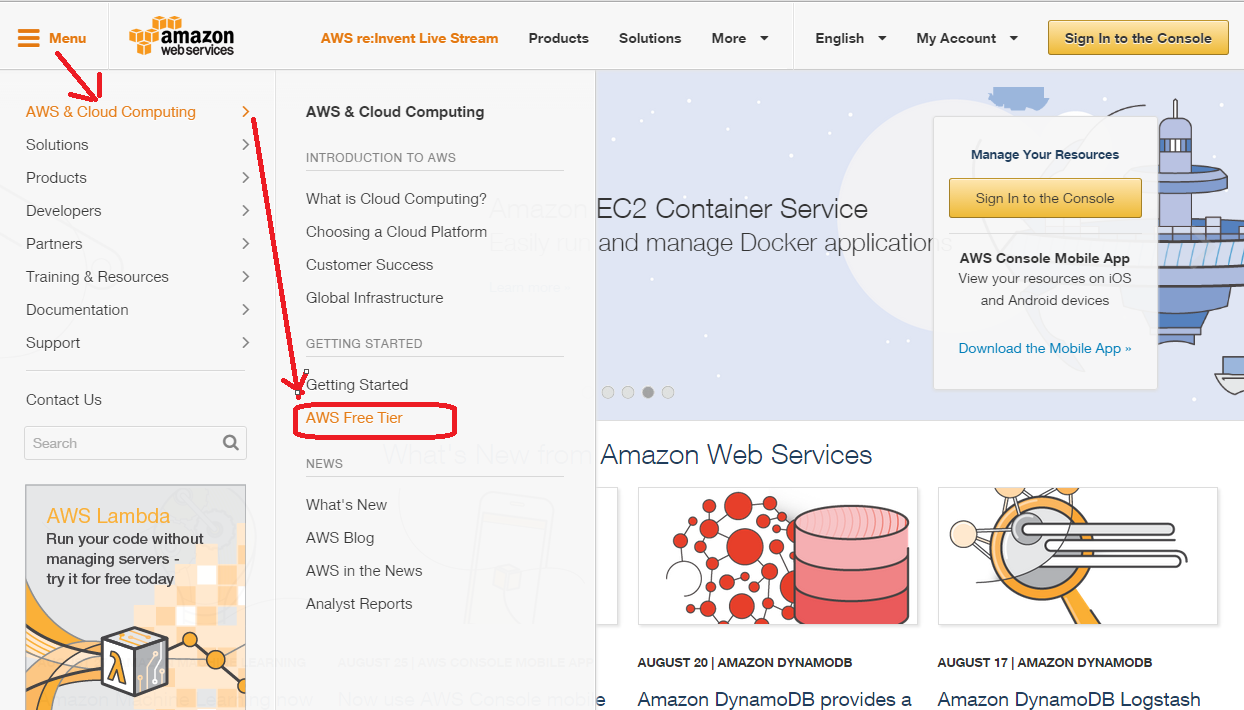
AWS Free Tier - Amazon Web Service free trial


AWS provide one year free tier service. It can be applied from https://aws.amazon.com/


Below is the application procedure, but it needs to be applied with your valid credit card info and contact phone number.


More details about what's covered in this free tier, see Amazon web site for updated full details.

Wednesday, August 12, 2015

Popular linux distributions


http://www.howtogeek.com/191207/10-of-the-most-popular-linux-distributions-compared/


Monday, July 6, 2015

Change config.txt to resolve HDMI resolution issue on Raspberry Pi.

[1] https://www.raspberrypi.org/documentation/configuration/config-txt.md

HDMI_IGNORE_EDID

Setting this to 0xa5000080 enables the ignoring of EDID/display data if your display doesn't have an accurate EDID. It requires this unusual value to ensure that it doesn't get triggered accidentally.

Enable Hibernate in Win7.


Ref [1] http://www.sevenforums.com/tutorials/778-power-plan-settings-change.html
      [2] http://www.sevenforums.com/tutorials/819-hibernate-enable-disable.html

Enable hibernate in advanced power plan settings.
( command line to open power settings: powercfg.cpl  )